

By Ema Katiraee, Certified Dubsado Specialist
TL;DR: A solid onboarding process for wedding planning clients includes a welcome email, client portal access, questionnaires for different stages of planning, and a scheduler for meetings. Here's what to include in each and how to automate it with Dubsado.
Onboarding is where the working relationship with a new couple actually begins. Done well, it sets expectations, gets you the information you need, and makes clients feel like they're in good hands from day one. Here's what a wedding planner client onboarding process should include and how to automate it in Dubsado.
What to Include in Your Wedding Planner Client Onboarding
Each wedding planner has a unique process, but certain key steps help create a smooth experience for both you and your clients. Here’s are some common elements that wedding planners include in their onboarding process:
The Welcome Email
When a couple books your services, send a warm welcome email. This email should:
Express excitement about working with them.
Confirm that you have received their signed contract and payment.
Provide a link to their client portal, where they can find contracts, invoices, and important documents.
Include an action item - like booking their initial call or completing a questionnaire - and the expectation that they complete this action step by a certain timeframe.
List your office hours and preferred methods of communication.
Include a Welcome Guide, which outlines your process and may include a list of recommended vendors and helpful planning tips.
Explain what comes next, so they know the next steps in the planning process.
💡 Pro Tip: Automate this email in Dubsado so clients receive it immediately after booking. This ensures they have everything they need from the start without any delay.
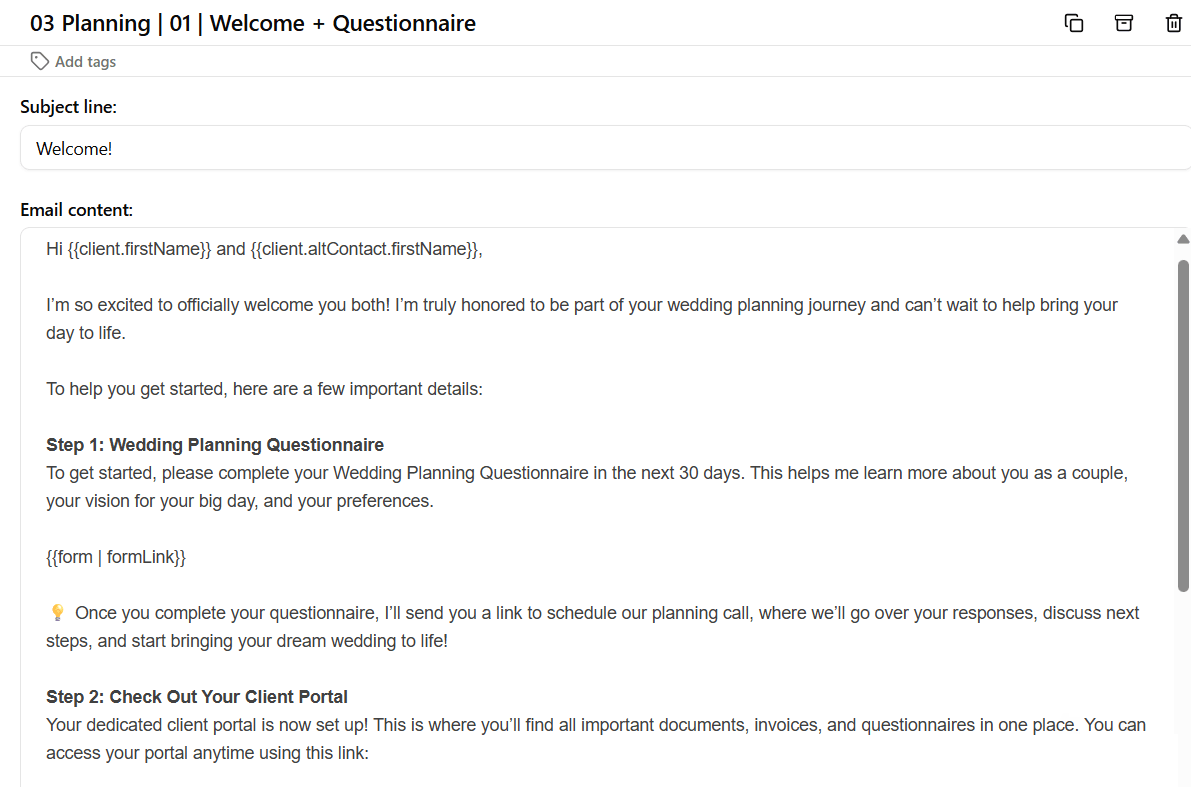
Example of a welcome email to a wedding planning client
Client Portal Access
A client portal is a valuable tool that helps keep all important documents, forms, and communication in one place. By giving your clients access to a dedicated portal, you provide them with an easy way to stay organized and informed throughout the planning process.
Clients can use the portal to:
View their signed contracts.
Access invoices and payment details.
Complete and submit questionnaires.
Book meetings with you through your scheduler.
Reference important documents needed throughout the planning process.
💡 Pro Tip: Dubsado’s client portal makes it easy to give your clients one central place for all their wedding planning information. Customize it with your branding and set it up so that clients always know where to find what they need.

Dubsado’s client portal
Questionnaires
Questionnaires are a great tool for gathering important details from your clients. Some planners send just one questionnaire, while others use multiple forms throughout the planning process. Here are some common types:
Planning Questionnaire – Collects wedding details like venue and guest count. It also asks the couple about their general wedding vision and priorities, including theme, style, and must-have elements.
Budget Questionnaire – Breaks down spending expectations and priorities to keep financial planning on track.
Vendor Details Questionnaire – Gathers information about vendors the couple has booked and any services still needed.
Wedding Timeline Questionnaire – Sent closer to the wedding date to finalize the event schedule - including ceremony and reception timelines, vendor arrival times, and bridal party schedules.
It’s also important to ask questions about the couple - like questions about their engagement story. You can even include some fun questions to learn more about them. I recommend asking these questions in whichever questionnaire goes out first.
💡 Pro Tip: Customize your questionnaires with Dubsado’s form builder to reflect your brand. Use automated workflows to send them at the right time and schedule follow-up reminders for clients who haven’t completed them.

Example of a Timeline Questionnaire designed in Dubsado
Client Meetings
Meetings are essential in wedding planning, and most planners have multiple calls in the months before the wedding. Instead of emailing back and forth to find a time, send a scheduler link so clients can easily book when it works for both of you.
Wedding planners may schedule different types of meetings throughout the planning process, including:
Onboarding Call – A first meeting to review questionnaire responses, discuss expectations, and outline the planning process.
Planning Check-Ins – Regular calls to update progress, review vendor bookings, and answer questions.
Budget Review Meetings – A focused discussion to track spending, make adjustments, and stay within budget.
Timeline Review Meetings – A meeting to finalize the wedding day schedule, ensuring vendors and logistics align.
Final Details Meeting – A last check-in before the big day to confirm all arrangements and address any final concerns.
💡 Pro Tip: Automate sending your scheduler link using Dubsado workflows so clients can book a meeting when you are available. This saves time and ensures that meetings are scheduled at the right points in the planning process without unnecessary back-and-forth emails.
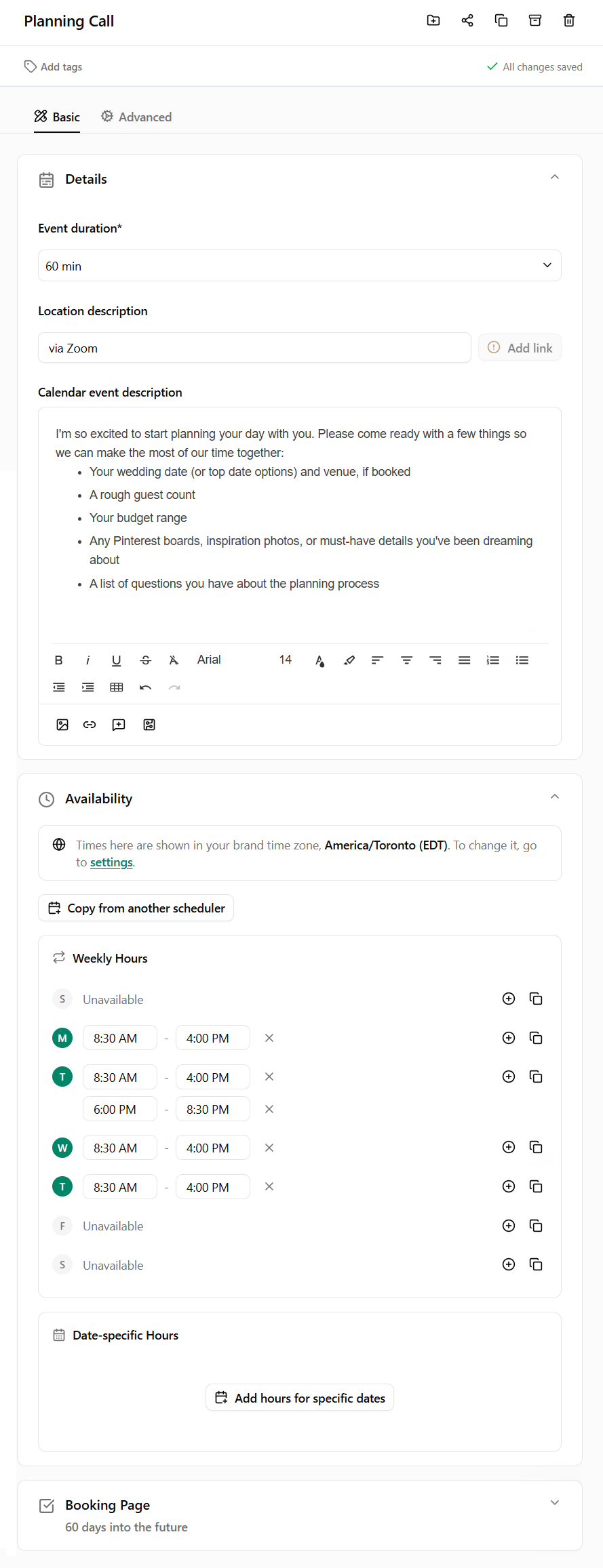
Example of a scheduler for Client Meetings
Automating Your Wedding Planner Client Onboarding with Dubsado
Dubsado makes it easy to set up an organized, automated onboarding process while still keeping things personal. You can:
Use workflows to trigger sending emails, forms, and schedulers at the right time.
Create workflows for different types of packages (i.e. full planning, partial planning, day-of coordination) to tailor onboarding to each client’s needs.
Set up canned email templates to save time while maintaining a personal touch.
Automate reminders to follow up with clients who haven't completed forms, keeping everything on track.
By automating your onboarding, you create a smooth and enjoyable experience for both you and your clients, ensuring no important steps are missed.
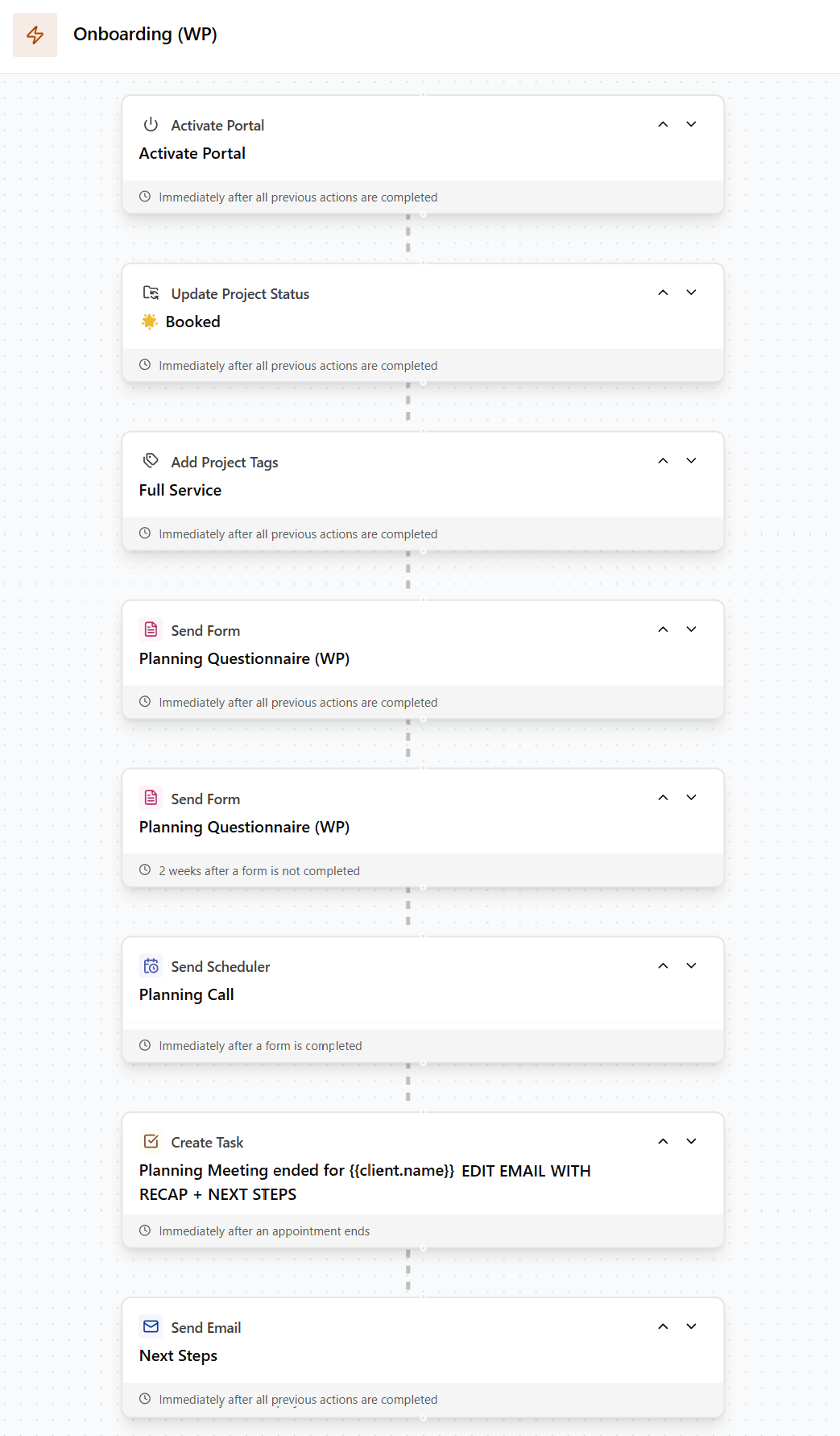
Example of how to automate some of the above steps using workflows in Dubsado
Want Your Wedding Planning Business Running on Autopilot?
If you want your entire client onboarding process built out in Dubsado, from the welcome email to the final questionnaire, I can help. Wedding planners are one of my specialties and I know exactly what your process needs. Book a discovery call and let's talk about what that looks like for your business.