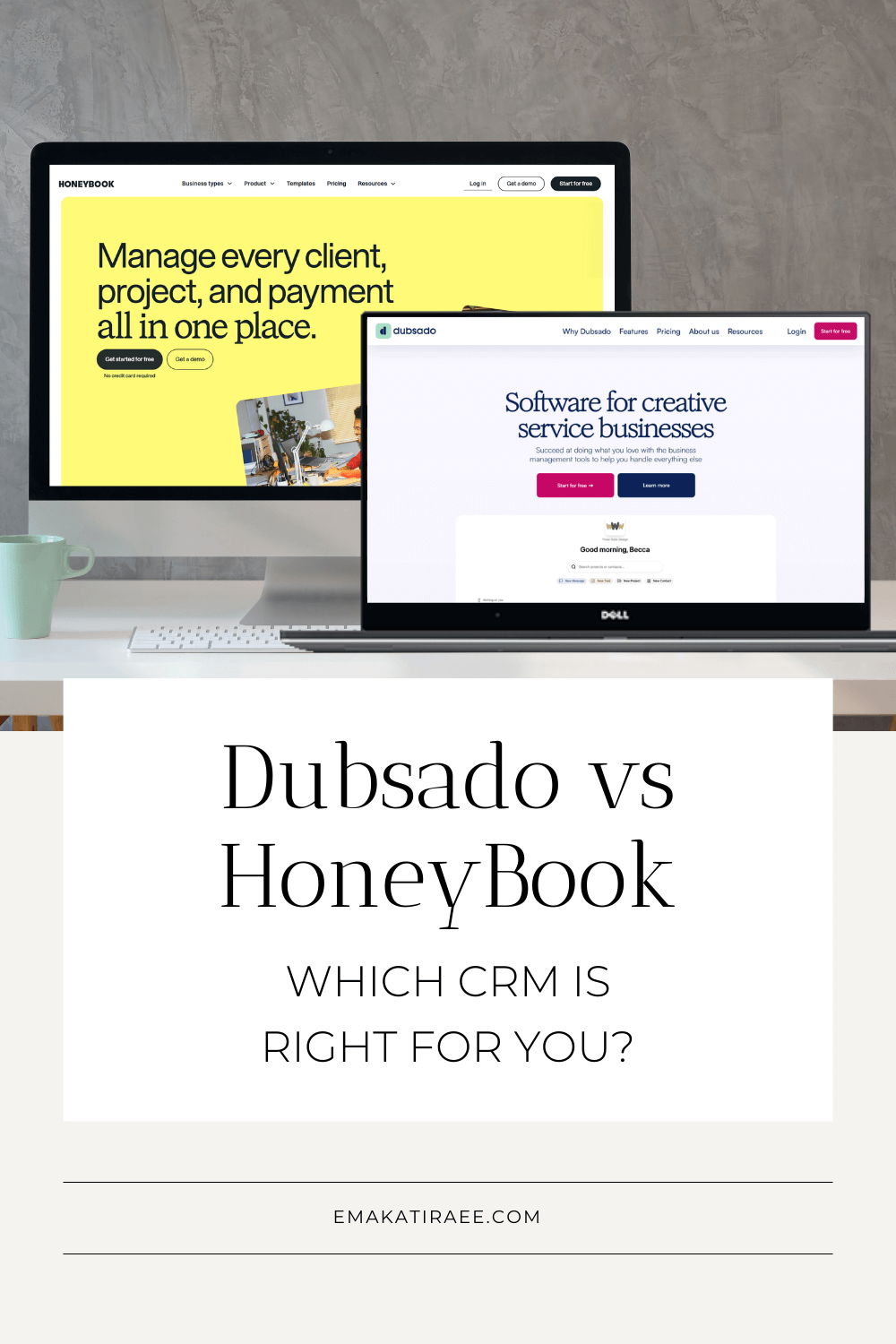
Dubsado vs HoneyBook (2026): What Nobody Tells You Before You Choose
Last Updated June 2026 | By Ema Katiraee, Certified Dubsado Specialist
TL;DR: if you're just starting out and want something up and running fast, HoneyBook is your best bet. If you need serious automation control and run a more complex business, Dubsado is worth the learning curve. Keep reading for the full breakdown on pricing, features, automations, and which one actually fits your workflow.
If you've been going back and forth between Dubsado and HoneyBook - or searching HoneyBook vs Dubsado trying to find a straight answer - you're not alone. These are the two most popular CRMs for service-based businesses, and the question of which one is right for you comes up constantly.
As a Certified Dubsado Specialist, I've spent years helping photographers, wedding planners, coaches, and designers set up and automate their client experience. I've seen what happens when someone picks the wrong platform. So here's the honest breakdown.
Disclosure: This post contains affiliate links, which means I may earn a commission if you click through and make a purchase. This comes at no additional cost to you.
Short on time? Jump to the quick comparison table or skip to the final verdict to see which platform wins for your business type.
Table of Contents
Watch: Dubsado vs HoneyBook: Full Video Comparison
Not a reader? This video walks through Dubsado and HoneyBook side by side - covering pricing, automations, Smart Files, payment processing, and the features that actually matter when you're choosing a CRM for your service business. It's the same comparison covered in this post, in a visual walkthrough format so you can see both platforms in action before committing to either one.
Quick Comparison: Which CRM Wins?
| Feature | Dubsado | HoneyBook |
|---|---|---|
| Best For | Complex automation & custom branding | Fast setup & user-friendly interface |
| Availability | Global (Stripe, Square, PayPal) | USA, Canada, UK and Australia Only |
| Workflows | Highly customizable & flexible | Highly customizable with Conditional Logic |
| Conditional Logic | Not yet | Yes |
| Edit After Automation Starts | Yes | No |
| Learning Curve | Steeper (Great for tech-comfy users) | Low (Great for beginners) |
| Autopay | Included at no extra cost | Higher fees for autopay transactions |
| Mobile App | Basic | Comprehensive |
| Free Trial | 21 days | 30 days |
| Custom CSS | Yes | No |
| Multiple Brands | Yes (add-on) | Premium Plan only |
| AI Tools | No | Yes |
| Payment Processors | Stripe, Square, PayPal | In-house processor |
| Guided Setup | No | Yes |
| Template Library | Growing | Extensive |
| Multi-Client Projects | No (only if not using automation) | Yes |
Why Compare Dubsado and HoneyBook?
Both Dubsado and HoneyBook are top choices for service-based businesses that need to manage contracts, invoices, client communication, and automation in one place. Choosing the wrong one can mean months of frustration, and potentially having to migrate everything later.
In this guide, you'll see their pricing, features, and key differences so you can make a confident decision. If you're new to either platform, you may want to start with a high-level overview first. I have a full breakdown of what Dubsado is and how it works for service based businesses, as well as a beginner guide to what HoneyBook is and who it is best for.
How Much Does Each Platform Cost?
HoneyBook Pricing
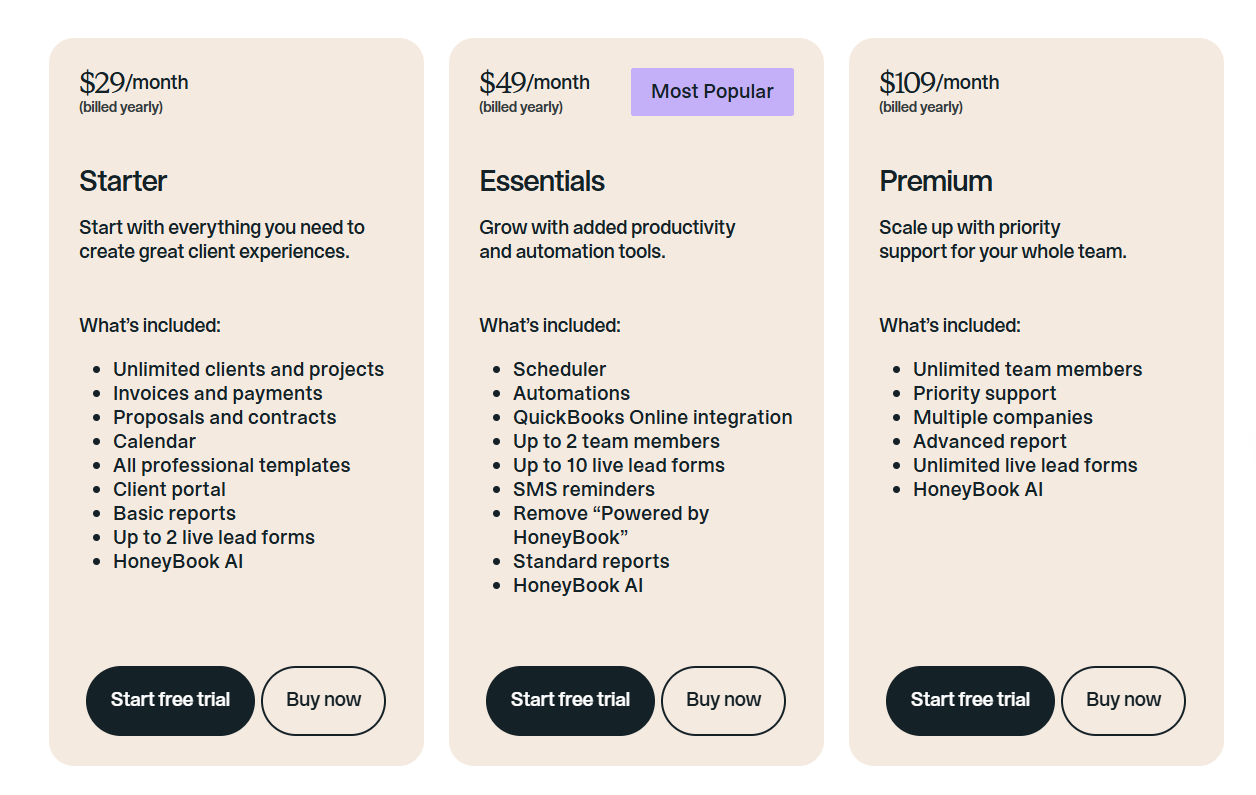
As of February 2025, HoneyBook updated its pricing:
Starter plan: $29/month billed annually or $36/month billed monthly
Essentials plan: $49/month billed annually or $59/month billed monthly
Premium plan: $109/month billed annually or $129/month billed monthly
HoneyBook also offers a 30 day free trial to test out their software.
For a deeper breakdown of HoneyBook's plans, read my fullHoneyBook pricing guide here.
HoneyBook plan pricing
Dubsado Pricing
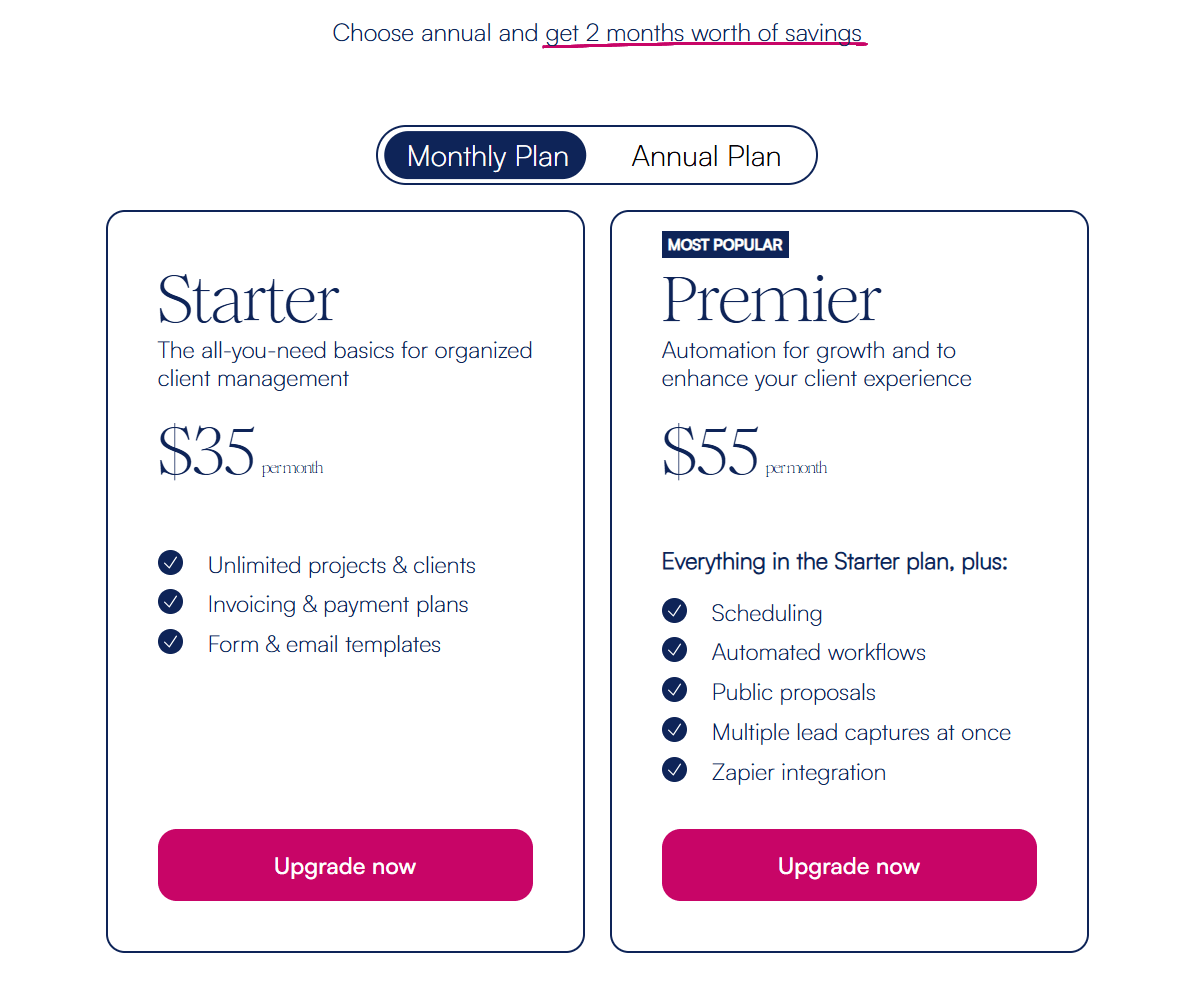
As of December 2025, Dubsado updated its pricing:
Dubsado Starter plan: $335/year billed annually or $35/month billed monthly.
Dubsado Premier plan: $525/year billed annually or $55/month billed monthly.
Dubsado also offers a 21 day free trial to test out their features.
For a deeper breakdown of plans and features, read my full Dubsado pricing guide here.
Dubsado’s pricing plan
Bottom line on pricing: Both platforms are comparable in cost. Don't let price be your deciding factor - the right platform for your workflow will save you far more time than the price difference is worth.
What Integrations Do They Offer?
HoneyBook Integrations
HoneyBook connects with:
Chrome Extension for Gmail - to manage your email via Gmail but keep track of things in HoneyBook
Calendly
Acuity
Meta leads
Email integration
Calendar integration
Zoom
Canva
Slack
Quickbooks
Flodesk
Prismm
Monday
Pic-Time
Asana
Zapier
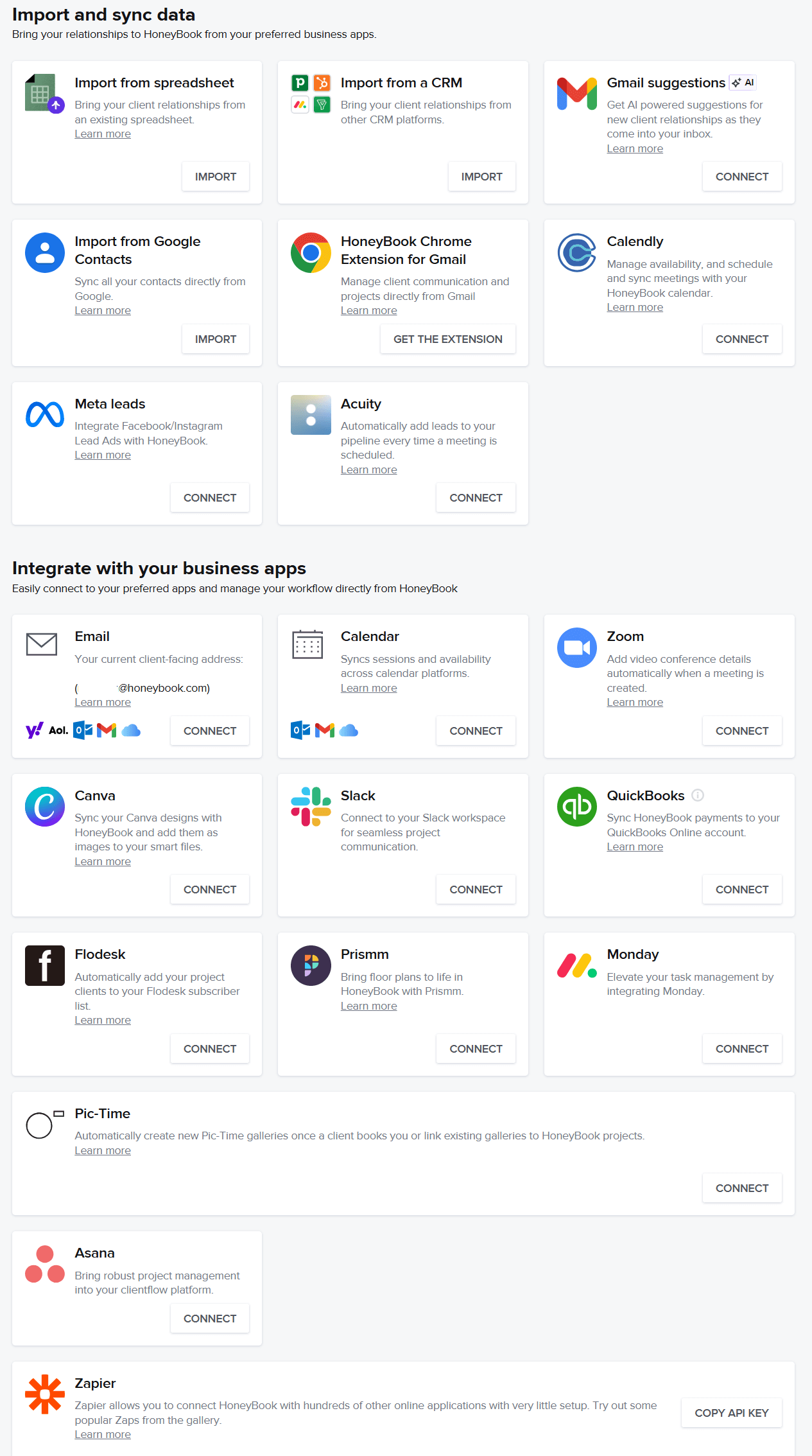
Honeybook integrations
Dubsado Integrations
Dubsado connects with:
Email integration
Calendar integration
Video conferencing (Google Meet, Zoom, 8x8)
Quickbooks
Xero
Zapier
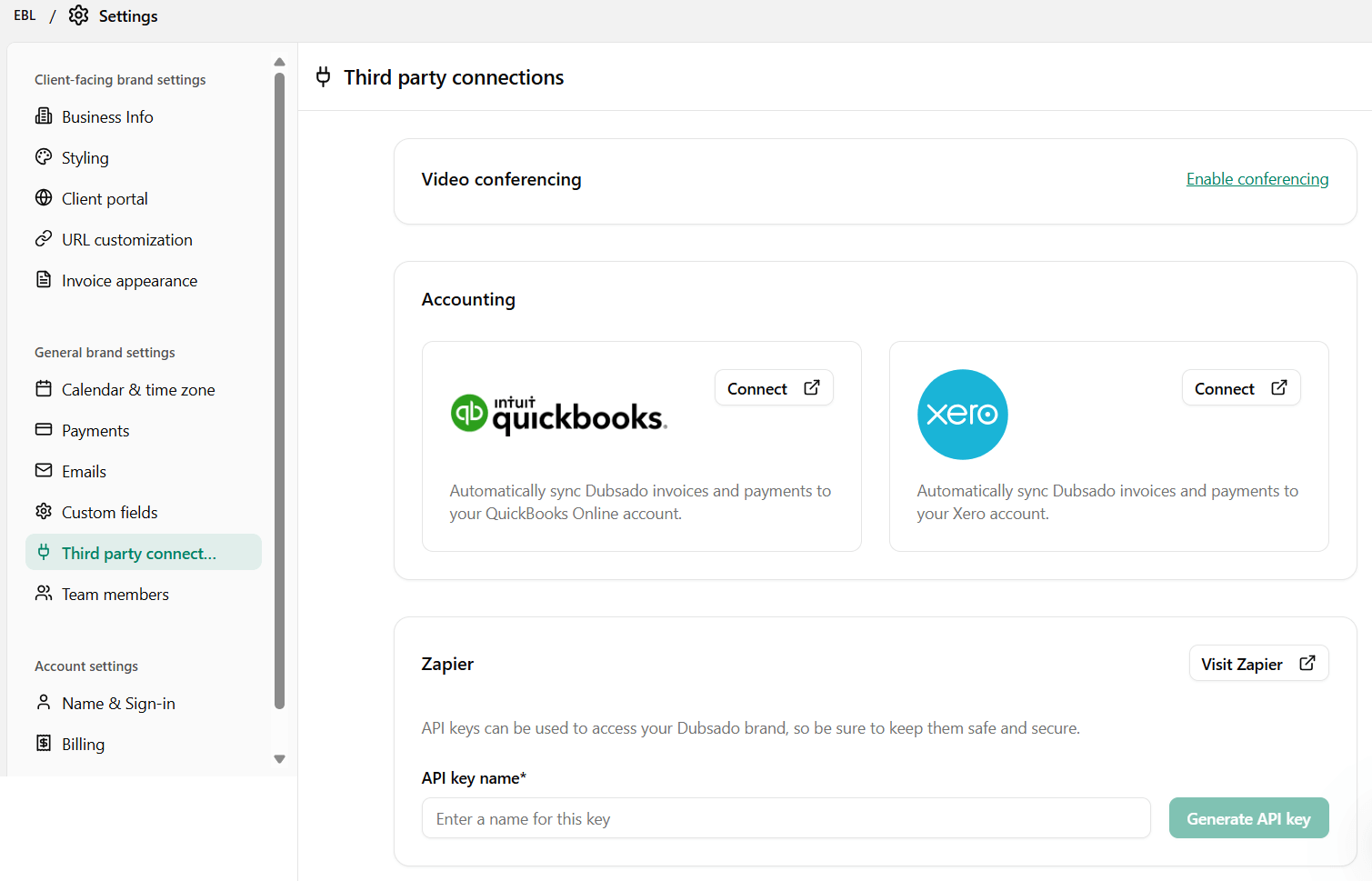
Dubsado integrations (email & calendar are on a different page)
Winner: HoneyBook has a broader native integration list, which matters if you rely heavily on tools like Calendly or Asana day-to-day.
What Features Make HoneyBook Stand Out?
Guided Setup
HoneyBook makes onboarding simple with a guided setup. When you create an account, you add your branding, select your industry, and HoneyBook loads templates tailored to your business. A setup checklist keeps you on track so you can start bringing in clients quickly. For someone who has never used a CRM before, this alone can save hours of confusion.

HoneyBook dashboard
Beautiful Templates
HoneyBook includes a large library of well-designed Smart File templates - for free. They're easy to customize and help you create branded documents without starting from scratch. Dubsado has stepped up its template game since the launch of Dubsado 3.0, but it still doesn't match the variety of designs that HoneyBook offers.

HoneyBook has many templates to speed up your smart file creation
Automations with Conditional Logic
HoneyBook's automations can branch based on what a client actually does, not just follow one fixed path. You can set up a "yes" path and a "no" path depending on things like whether someone booked a call, paid an invoice, or completed a form. This means one automation can adapt to different client behavior instead of you needing to build separate workflows for every possible outcome. For businesses with a few different client journeys depending on how someone responds, this flexibility is a real advantage over Dubsado's current setup.
Smart Files
Smart Files are one of HoneyBook's most flexible features. Instead of being limited to a single proposal–contract–invoice structure, you can combine proposals, contracts, invoices, schedulers, and questionnaires into a single document. This gives you more creative control over the client journey and makes the experience feel seamless for your clients.
Multi-Client Projects
HoneyBook allows you to add more than one participant to a project. All clients involved can view the same forms, contracts, and communication - even when sent via automations. This is especially useful for wedding professionals and others who work with couples or teams.
AI Tools
HoneyBook has recently leaned into AI to help you work faster. You can now use their AI tools to summarize long client meetings into key points or have it draft email responses for you, which is a huge help and time saving feature.
Mobile App
When it comes to the mobile app, HoneyBook is the clear winner. Their app is comprehensive, allowing you to manage your pipeline, send files, and chat with clients on the go. In comparison, Dubsado’s app is quite basic in comparison and is mostly useful for checking notifications or viewing project details rather than doing real work.
What Features Make Dubsado Stand Out?
Customizable Flows
What really sets Dubsado apart is the level of control you keep once an automation is already running. You can personalize an email or update a specific form before it reaches your client's inbox, even after the flow has started. HoneyBook doesn't allow this kind of mid-automation editing, so once a HoneyBook automation begins, you're locked into what you built.
Global Access
HoneyBook is only available in the US, Canada, the UK and Australia - you need a local bank account in those countries to receive payment. Dubsado works anywhere you can connect Stripe, Square, or PayPal, making it the only viable option for international businesses.
Custom Branding
Dubsado gives you more control over form design and branding than HoneyBook - especially when it comes to CSS customization, which lets you build forms that look almost indentical to your website. HoneyBook's client portal has improved with their 2025 update and now supports font, color, and image customization, but Dubsado still has the edge when it comes to form design flexibility overall.
Payment Processing
Dubsado integrates with Stripe, PayPal, and Square. You can set up autopay at no extra cost, and transaction fees are typically lower than HoneyBook's in-house processor - especially for autopay.
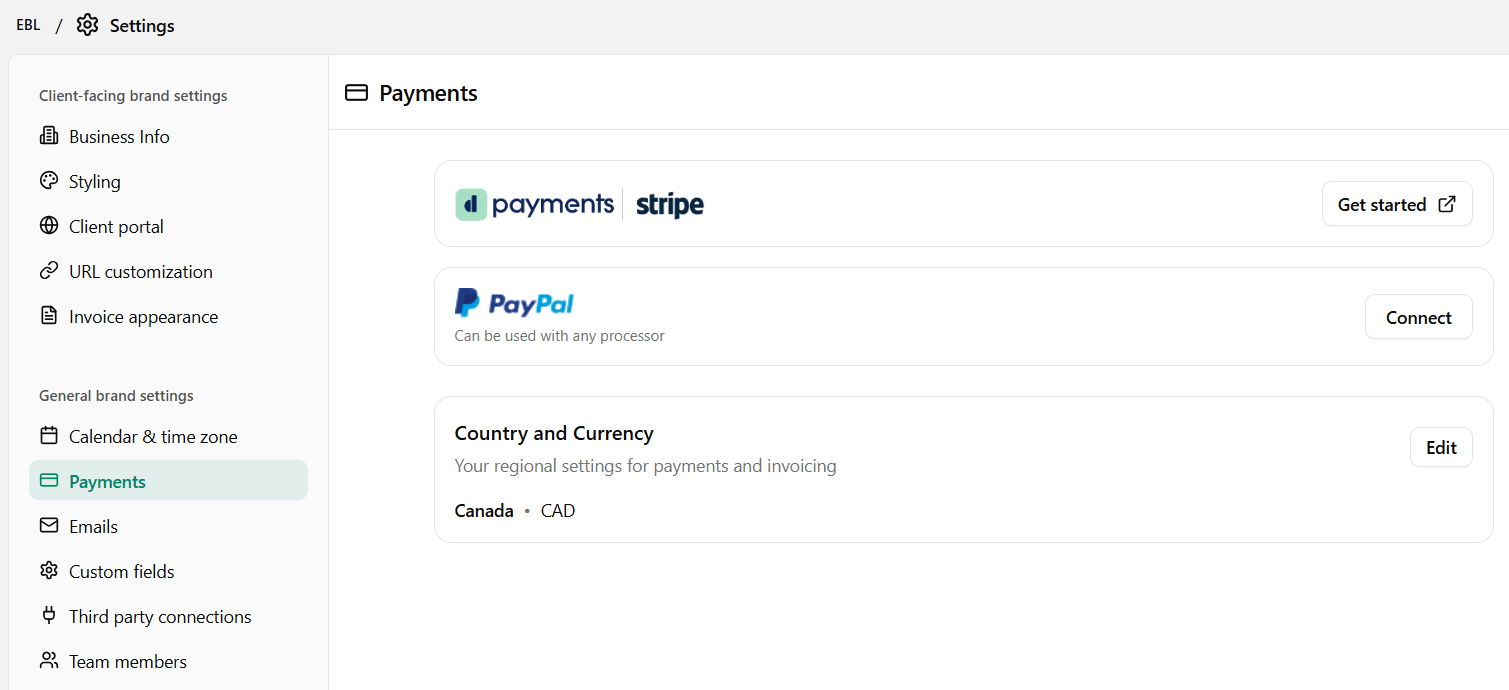
Dubsado uses Stripe, Square and PayPal as payment processors
Multiple Brands
If you run more than one business or offer services under different brand names, Dubsado lets you manage multiple brands under one account (available as an add-on). HoneyBook only offers this under it’s Premium plan.
How Do Automations Compare?
Beyond the core difference covered above, here's a quick look at what each platform's automation can actually do.
Dubsado workflows can combine multiple triggers and actions in a single flow, including actions like send contract, send form, create invoice, and start a new flow. You can pause a flow or add manual checkpoints at any of these steps, which is what makes editing content after the flow has begun possible. If your client process requires you to customize emails or forms before they go out, Dubsado's control is hard to replace.
HoneyBook Automations run on a single trigger per automation, but can branch using conditional logic depending on whether a client completed a certain action, like booking a call or paying an invoice. This is a real win for HoneyBook. Dubsado doesn't offer this yet, though it's reportedly in progress.
Because of the single trigger limit, building the equivalent of one longer Dubsado flow in HoneyBook usually takes several automations chained together instead of one. HoneyBook has also added a "Create email draft" action, though it's currently only available for emails, not forms, so you still can't edit forms once an automation starts.
So which one wins? It depends on how hands-on you want to be. If you're comfortable setting an automation and letting it run exactly as built, HoneyBook's conditional logic means it can adapt to client behavior without you touching anything. If you'd rather step in and personalize content while an automation is already running, Dubsado's flexibility is hard to match.
How Do Payment Processors Compare?
HoneyBook: Uses its own in-house payment processor. Credit card payments are charged 2.9 % + 25¢ per transaction. American Express or Discover cards are charged 3.4% + 9¢ per transaction. ACH bank transfers are 1.5%. Autopay is available, but raises the fee to 3.4% plus 9¢ per transaction.
Dubsado: Connects with Stripe, Square, and PayPal. You pay only the standard processing fees for your country, and autopay is included with no extra charge.
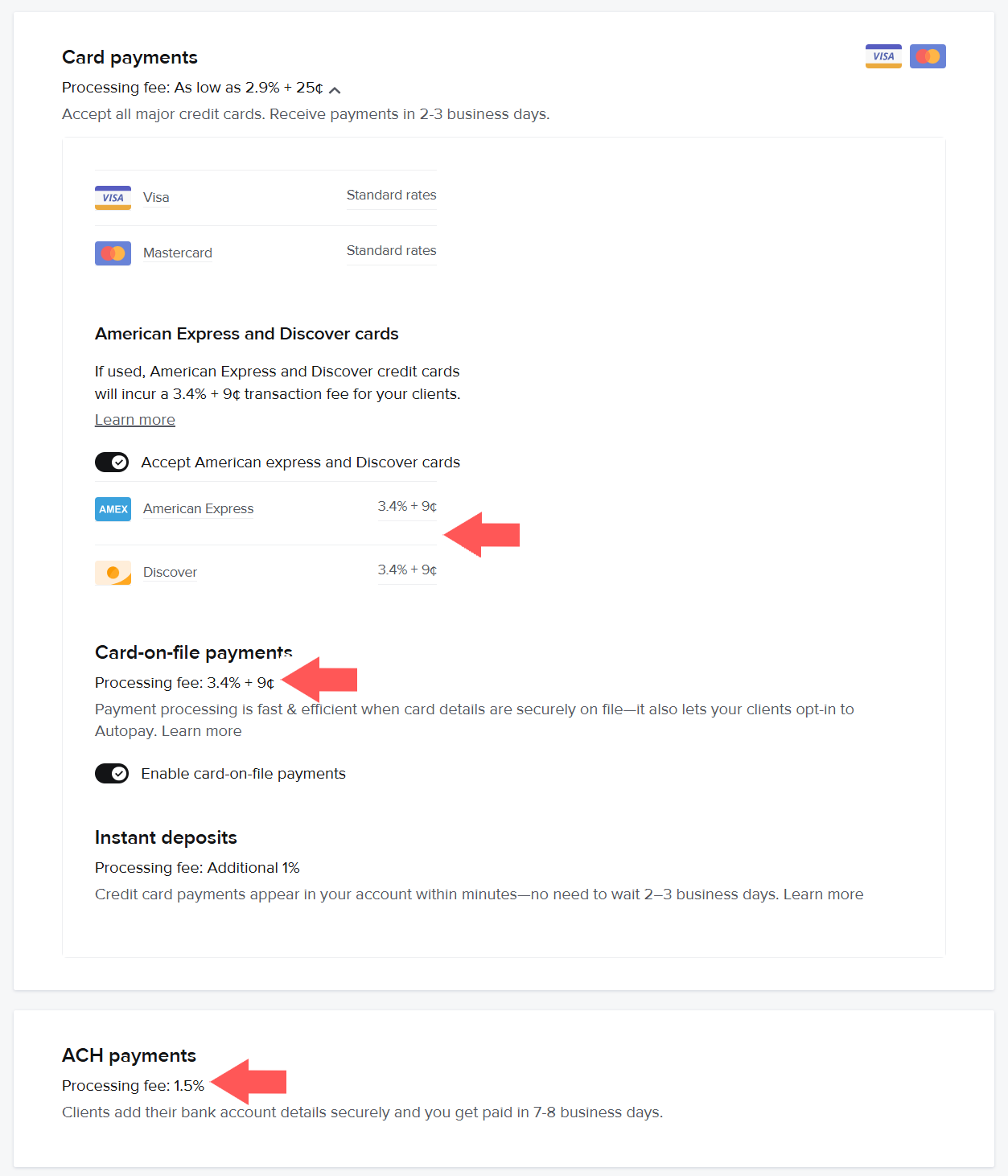
HoneyBook charges a higher processing fee for using autopay
For businesses that use autopay regularly, Dubsado's lower fees can add up to meaningful savings over time.
Free Trial Comparison
HoneyBook: 30-day free trial.
Dubsado: 21-day free trial.
Both companies provide a trial period with enough time to build out your system, test your flows and automations, and decide if it's the right fit before committing.
Dubsado vs HoneyBook for Wedding Planners 💍
Wedding planners typically manage long timelines, multiple decision-makers, contracts, invoices, questionnaires, and ongoing communication over many months.
Dubsado is often the better fit for wedding planners if you:
Need detailed workflows that span months or even a year
Want full control over when emails, forms, and invoices are sent
Manage complex onboarding, planning, and post wedding processes
Dubsado’s flows allow wedding planners to automate large portions of their process while still pausing steps, editing emails, or making manual adjustments when needed. HoneyBook can work well for planners with simpler offerings or fewer custom steps, but many wedding planners eventually outgrow its automation limits.
Dubsado vs HoneyBook for Photographers 📸
Photographers often have more repeatable, session based workflows that need to run smoothly and consistently.
HoneyBook can be a good fit for photographers if you:
Want a simpler and faster setup
Offer similar packages for every client
Prefer simpler automations
Dubsado is a better fit for photographers if you:
Offer multiple session types or custom packages
Want detailed post session workflows
Need more control over when questionnaires, emails, and follow up emails are sent
Work across weddings, portraits, branding, or commercial photography
Photographers who start with HoneyBook often switch to Dubsado as their offerings become more customized.
HoneyBook vs Dubsado: Which One Should You Choose?
Choose HoneyBook if you want:
An easier guided setup and ready-to-use templates
Smart Files with more flexibility
Multi-client / group projects
Automations that include conditional logic
AI tools to summarize meetings or draft emails
A comprehensive mobile app to work from your phone
A simpler experience overall, especially if you're just getting started
Choose Dubsado if you want:
The ability to edit emails and forms after a workflow has already started
More control over your branding and portal design
Payment processors like Stripe, Square or PayPal
Lower payment processing fees for autopay
To run a business outside the US, Canada, the UK or Australia
Complex, multi-step automation that handles most of your client process
Multiple brands managed under one account
There's no universally "better" platform. There's just the one that fits how you actually work.
If your client process is relatively straightforward and you want to get up and running fast, HoneyBook delivers. If you want to build a system that runs your business for you - with automations that handle the heavy lifting while still leaving room for a personal touch - Dubsado is worth every minute of the setup time.
Looking at options beyond HoneyBook? See my full breakdown of Dubsado alternatives.
FAQs
Is Dubsado harder to learn than HoneyBook?
Yes. Dubsado has a steeper learning curve. HoneyBook is designed to get you up and running quickly with guided setup and pre-built templates. Dubsado gives you more flexibility but requires more time to configure. If you want Dubsado's power without the setup headache, that's exactly what my done-for-you setup service handles.
Can I switch from HoneyBook to Dubsado (or vice versa)?
Yes. Switching is manageable but takes time since you'll need to rebuild your forms, templates, and workflows in the new platform. Dubsado offers a form migration service to help bring your existing templates into the platform so you're not rebuilding from scratch.
Which is cheaper: Dubsado or HoneyBook?
They're very comparable in price at around $35–$55/month depending on plan and billing cycle. Dubsado can work out cheaper annually on its Starter plan. However, if you use autopay frequently, Dubsado's lower processing fees can make a noticeable difference over time.
Is HoneyBook available outside the US?
No. HoneyBook requires a US or Canadian bank account to receive payments. If you're based outside North America, Dubsado is your only option between the two.
Which CRM is better for beginners?
HoneyBook. Its guided setup, pre-built templates, and intuitive interface make it significantly easier to get started with - especially if you've never used a CRM before.
Which CRM is better for scaling a service business?
Dubsado, in most cases. Its advanced automation, deeper customization, and ability to handle complex multi-step client journeys make it better suited for businesses with growing client loads or varied service offerings.
What would your client experience look like if it actually ran itself?
Take the free quiz to find out what your setup is missing and where to start.
Want Help Setting Up Dubsado or HoneyBook?
Setting up a CRM takes time, but you don’t have to do it alone. I offer custom done-for-you setups for both Dubsado and HoneyBook, where I help you map out your client process, build all your templates, automate repetitive tasks, and create a system that supports both you and your clients.
Book a free discovery call to find out which platform is the right fit and whether we're a good match to work together.
If you choose Dubsado, sign up using my code EMAKATIRAEE to save 30% on your first month or year.
If you choose HoneyBook, sign up with my link and save 30% on your first year.