
What Is Dubsado? A Simple Guide for Service-Based Businesses (2026)
Last Updated March 2026 | By Ema Katiraee, Certified Dubsado Specialist
Disclaimer: This post contains affiliate links. If you sign up using my link, I may earn a commission at no extra cost to you.
Dubsado is a client relationship management (CRM) system built for service-based businesses.
If you've been running your business out of Google Docs, Wave invoices, and a Calendly link duct-taped together, it's probably the tool people are referring to when they say they finally got their backend under control. It brings everything into one place: contracts, invoices, scheduling, client forms, and emails, all without the chaos of juggling five different tabs.
As a Certified Dubsado Specialist who sets up these systems for photographers, coaches, and wedding planners every day, I’ve seen first hand what a difference the right software can make. And this guide covers everything you need to know before deciding if it's the right fit for your business.
Short on time? Jump to the verdict or the pros and cons
In this guide:
Note: Dubsado recently underwent a large update with the launch of Dubsado 3.0. While this guide covers the core platform, if you specifically want to see the new features of 3.0, head over to my complete guide to Dubsado 3.0.
What Does Dubsado Actually Do?
Most service providers start out juggling a handful of separate tools: one for contracts, one for invoices, one for scheduling, maybe a form builder on top of that. It works, until it doesn't. Things fall through the cracks, clients get confused, and you're copying and pasting the same email for the tenth time.
Dubsado consolidates all of that into one system. Here's what it handles:
| Feature | What it Does for Your Business |
|---|---|
| Lead Capture | Pulls website inquiries automatically into your system so no lead goes unanswered. |
| Proposals | Lets clients choose packages and see pricing in a branded, interactive document. |
| Contracts | Sends legally binding contracts with electronic signatures. |
| Invoicing | Creates branded invoices, payment plans, and automated reminders. |
| 3-in-1 Proposals | Combines your proposal, contract, and invoice into one single step for faster booking. |
| Scheduler | Replaces tools like Calendly with automated booking pages. |
| Client Portal | Gives clients a private hub to access all their documents and communication. |
| Workflows/Flows | Automates your entire onboarding and follow-up process. |
| Canned Emails | Saves email templates so you stop writing the same message from scratch. |
The idea is that once your system is built, Dubsado handles the repetitive admin work. So you can focus on working with your clients.
How Dubsado Works: A Real-World Example
Here's what the experience looks like once Dubsado is set up properly for a service provider:
Inquiry comes in: a potential client fills out your contact form on your website. Dubsado automatically adds them as a lead and fires off a reply with your scheduler link, while the lead is still hot.
They book a call: they pick a time, complete a short questionnaire, and receive automatic reminders. No back-and-forth emails.
You send a proposal: after your call, you customize and send a 3-in-1 document: proposal, contract, and invoice all in one. The client can review, sign, and pay in one go.
Onboarding kicks off automatically: the moment they pay, your welcome email, onboarding form, and any next steps are triggered without you lifting a finger.
You stay in control: you can pause the automation at any point to review or personalize something before it goes out. The system works for you, not instead of you.
Your role shifts from chasing admin tasks to reviewing details and personalizing where it matters.

Dubsado allows you to fully brand your forms so they feel like a seamless extension of your website.
Want To See Dubsado In Action?
If you'd rather watch than read, this walkthrough shows exactly how Dubsado works inside the platform — from inquiry to automated onboarding.
Who Is Dubsado Best For?
Dubsado is built for service-based businesses that work one-on-one with clients and have a repeatable process. It's especially well suited for:
Creative professionals: Photographers, Brand & Web Designers, Interior Designers and Copywriters.
Event and wedding professionals: Wedding Planners and Event Coordinators.
Consultants and coaches: Business Coaches, Consultants, Bookkeepers, and Professional Organizers.
The common thread is that these businesses have a client journey with multiple steps: inquiry, booking, onboarding, delivery, offboarding. And they do it repeatedly. Dubsado is designed to systematize exactly that.
When is Dubsado NOT the right fit?
Dubsado is powerful, but it isn't for everyone. It may not be a good fit if you:
Only sell digital products or physical goods: use Shopify or a dedicated e-commerce platform instead.
Only need simple invoicing: a payment processor like Stripe or a tool like Wave is simpler and cheaper.
Only need scheduling: Calendly or Acuity does that job with less overhead.
Are not ready to invest time in setup: Dubsado requires time to set up to work properly. If you need something running today with no learning curve, HoneyBook is easier to launch quickly.
Have a large team and need team scheduling: Dubsado’s scheduler connects to a single calendar, so it does not work for team scheduling. Acuity or other schedulers are better suited.
Are not comfortable with tech: Dubsado has a learning curve, and if you find that tech stresses you out - another CRM may be a better fit.
What Features Does Dubsado Include?
1. Invoicing
Branded Invoices: Create invoices that have your branding elements for a professional look.
Payment Plans: Offer flexible payment schedules that work for you and your clients.
Payment Reminders: Automate payment reminders so you're not manually chasing unpaid invoices.
Payment Processors: Connect Dubsado Payments powered by Stripe, PayPal, or Square to accept credit card or ACH payments directly.
2. Contracts
Legally Binding Contracts: Build contracts in Dubsado that use electronic signatures.
Reusable Templates: Save time by creating contract templates for all your client agreements.
Smart Fields: Personalize contracts with smart fields to auto-populate client information, eliminating the need to edit contracts manually before sending.
3. Proposals
Beautiful Designs: Customize proposals that match your brand.
Interactive Options: Allow clients to select packages or add-ons inside the proposal.
3-in-1 Proposals: Combine your proposal, contract, and invoice into a single document so clients can choose, sign, and pay in one sitting.
4. Forms
Custom Branding: Design forms that match your brand’s colors, fonts, and style.
Drag-and-Drop Builder: Add images, videos, text blocks, and custom fields without touching any code.
Reusable Templates: Save forms as templates, so you don't have to start from scratch for every client. Whether you need questionnaires, feedback forms, or onboarding documents, Dubsado has you covered.
5. Scheduling
Integrated Scheduler: Sync your calendar with Dubsado’s scheduler to show your availability in real-time.
Custom Meeting Types: Set up separate booking pages for discovery calls, consultations, or project check-ins.
Automated Follow-Ups: Send customizable confirmation and reminder emails for every upcoming appointment automatically.
6. Client Communication
Email Sync: Connect your own email address so you can view all client emails inside Dubsado alongside the rest of their project.
Canned Emails: Create canned email templates for responses you send repeatedly and pull them up with a single click.
Project-Specific Threads: Every email tied to a client project lives in one place, making it easy to track the full conversation without digging through your inbox.
7. Workflows (now called Flows)
Automated Actions: Set up flows that automatically send forms, contracts, invoices, and emails based on triggers like a form submission or a contract being signed.
Customizable Steps: Design flows tailored to your exact services so every client receives the same amazing experience without you manually managing each step.
Pause and Personalize: Unlike most CRMs, Dubsado lets you pause a flow mid-sequence to review or edit an email before it goes out - automation without losing the personal touch.
Visual Builder: In Dubsado 3.0, flows now have a visual builder so you can see your entire automation mapped out as a flowchart rather than a list.
Save Time: Reduce manual tasks and eliminate the risk of missing a step in your client process.
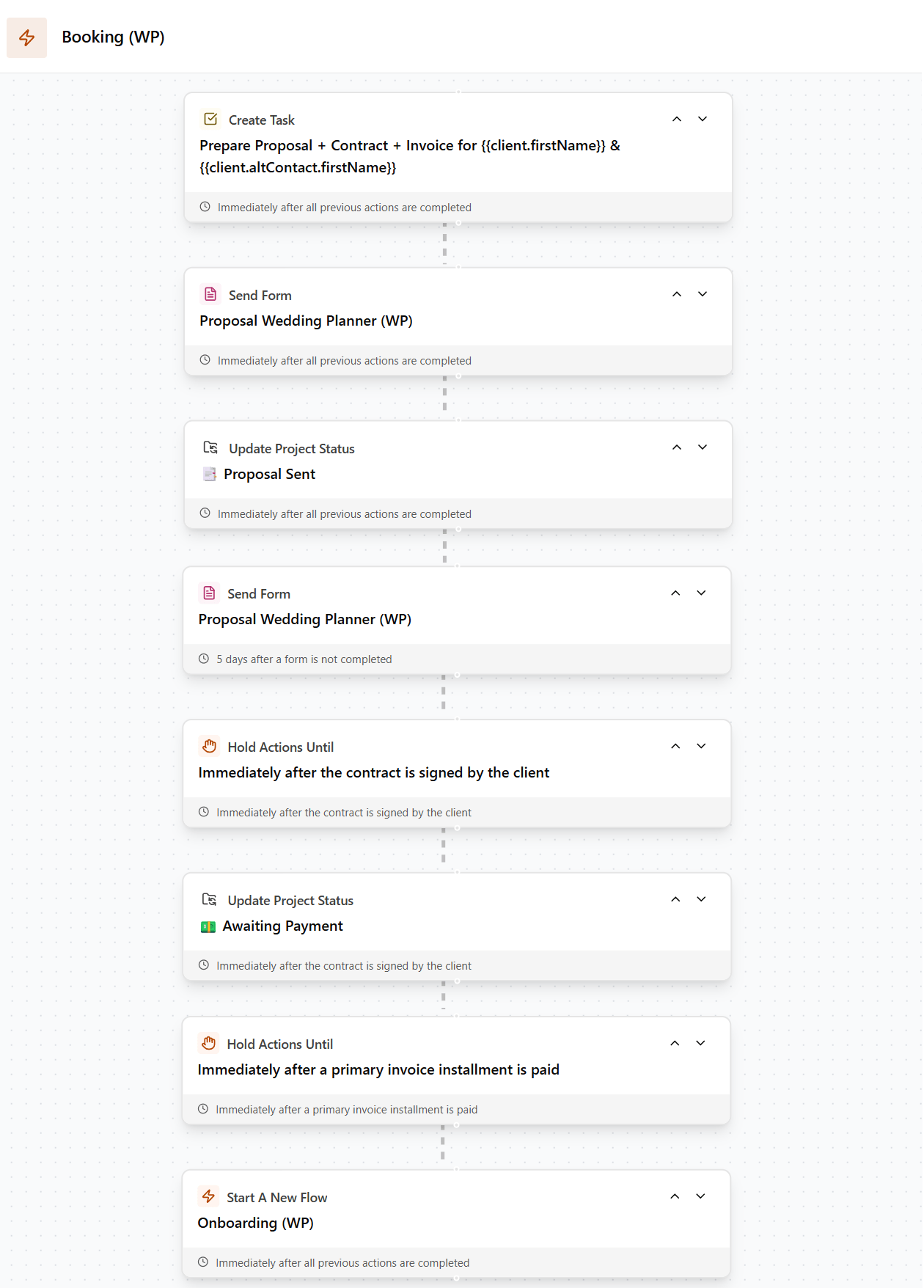
Dubsado’s visual workflow builder: Set up your triggers once and let the system handle your client follow-ups on autopilot.
8. Client Portal
Centralized Access: Clients can view all their invoices, contracts, forms, and communication in one place. No more "can you resend that?" emails.
Custom Branding: White-label the portal with your own domain so clients never see the Dubsado name, just your brand.
Mobile-Friendly: The portal is accessible on any device, ensuring a smooth experience for your clients whether they're on desktop or phone.
Professional Experience: Give clients a polished, organized hub that feels custom-built rather than cobbled together from separate tools.
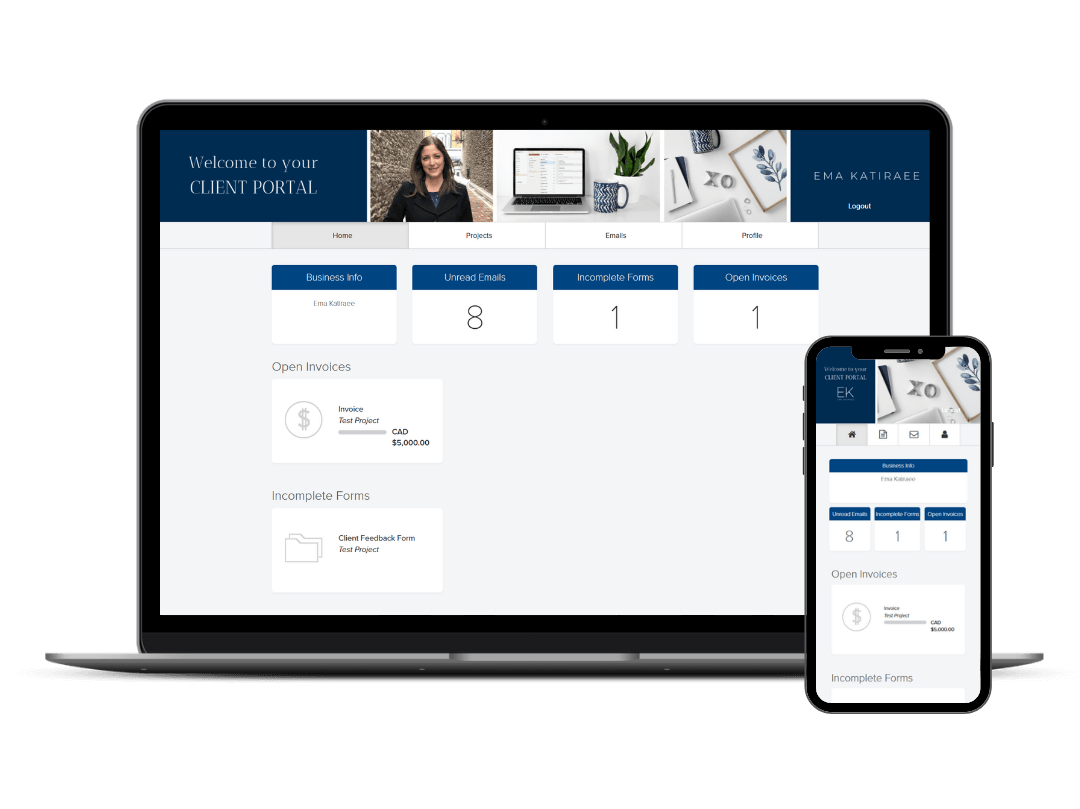
The client portal gives your clients a private, branded hub to access their contracts, invoices, and forms without digging through their inbox.
What Are the Pros and Cons of Dubsado?
Pros
Deep customization: forms, emails, portals, and workflows can all be tailored to match your exact process and brand. Nothing looks like a generic template.
Powerful automation: once built, your flows handle most of the admin work for you. Inquiry response, onboarding, payment reminders, and offboarding can all run on autopilot.
Global availability: unlike HoneyBook, Dubsado works anywhere you can connect Stripe, Square, or PayPal. No local bank account required.
Lower payment processing fees: because Dubsado uses third-party processors, autopay and transaction fees are typically lower than HoneyBook's in-house processor.
Long free trial: 21 days of full access gives you enough time to actually build out your system and test it before paying.
You stay in control: the ability to pause a flow and edit an email before it sends is something most CRMs don't offer. It's automation without losing the personal touch.
Cons
Steep learning curve: Dubsado is not a plug-and-play tool. Building your first workflow, setting up proposals, and connecting everything properly takes time. I've seen experienced tech users spend weeks on setup before it clicks.
Workflow emails only go to main contact: you can have a alternate contact on a project, but they will not receive any automated emails sent via flows. This is a problem for some industries.
Basic mobile app: the Dubsado mobile app has improved but is still limited compared to HoneyBook's. If you run your business primarily from your phone, this is a real limitation.
Not ideal for teams: scheduling is connected to a single calendar, so it doesn't scale well for larger teams that all need booking links.
How Much Does Dubsado Cost?
As of December 2025, Dubsado offers two plans with a 21-day free trial:
Starter Plan | $35/month or $335/year: Includes unlimited projects, invoices, contracts, and forms. Good for getting organized, but does not include the scheduler or automated Flows.
Premier Plan | $55/month or $525/year: Includes everything in Starter plus the scheduler and Flows. This is the plan most service providers need to actually automate their backend.
The old "free for your first 3 clients" trial has been retired. The current 21-day trial includes full Premier access, which gives you enough time to build and test a real system.
Use code EMAKATIRAEE at checkout to save 30% on your first month or year.
Dubsado vs HoneyBook
The two most common CRMs for service-based businesses are Dubsado and HoneyBook. Here's the short version:
| Feature | Dubsado | HoneyBook |
|---|---|---|
| Best For | Complex automation & custom branding | Fast setup & user-friendly interface |
| Availability | Global (Stripe, Square, PayPal) | USA, Canada, UK and Australia Only |
| Workflows | Highly customizable & flexible | Highly customizable with Conditional Logic |
| Conditional Logic | Not yet | Yes |
| Edit After Automation Starts | Yes | No |
| Learning Curve | Steeper (Great for tech-comfy users) | Low (Great for beginners) |
| Autopay | Included at no extra cost | Higher fees for autopay transactions |
| Mobile App | Basic | Comprehensive |
| Free Trial | 21 days | 30 days |
| Custom CSS | Yes | No |
| Multiple Brands | Yes (add-on) | Premium Plan only |
| AI Tools | No | Yes |
| Payment Processors | Stripe, Square, PayPal | In-house processor |
| Guided Setup | No | Yes |
| Template Library | Growing | Extensive |
| Multi-Client Projects | No (only if not using automation) | Yes |
HoneyBook is the better choice if you want something up and running quickly with minimal setup. Dubsado is the better choice if you need complex automation and full control over your client experience.
For a complete side-by-side breakdown, see the full Dubsado vs. HoneyBook comparison.
Is Dubsado Worth It?
For the right business, yes, genuinely. I've set up Dubsado for dozens of service providers and the ones who invest in a proper setup consistently say it's one of the best things they've done for their business. Not because it's flashy, but because it quietly handles dozens of tasks that used to eat up hours every week.
That said, it's only worth it if you're ready to invest in the setup. If you go in expecting it to be plug-and-play, you'll get frustrated and abandon it before it delivers. The learning curve is real.
Dubsado is worth it if:
You work one-on-one with clients and have a repeatable process.
You're losing time to repetitive admin tasks like sending the same emails and chasing invoices.
You want your client experience to feel polished and professional.
You're willing to invest a time (or hire someone) to set it up properly.
Dubsado is not worth it if:
You need something running today with no learning curve.
You're not ready to commit to learning the platform.
You struggle with tech or software.
Want the fuller picture, including what's surprised me after years of using Dubsado daily in my own business? Read my complete Dubsado review.
How Do You Get Started with Dubsado?
If you decide Dubsado is the right fit, the best first step is mapping out your client process on paper before touching the platform. Know your steps from first inquiry to final delivery before you start building anything. That clarity makes the setup dramatically faster and less overwhelming.
If you're already using Dubsado, check out my guide to what's new in Dubsado 3.0.
If you want to hire an expert, I offer custom Done for you Dubsado setups that help you build a system that actually matches how you work.
Browse ready-to-use Dubsado templates at my shop.
Want it done for you? Book a free discovery call to explore a custom setup.
FAQ
What is Dubsado used for?
Dubsado is used to manage leads, send proposals, contracts, and invoices, schedule client meetings, and automate workflows so service-based businesses can run their backend on autopilot.
Is Dubsado good for small businesses?
Yes. It's built specifically for small service-based businesses that work one-on-one with clients. It's overkill for product businesses or solo operators who just need basic invoicing.
Does Dubsado replace other tools?
Dubsado can replace schedulers like Calendly, contract tools like HelloSign, basic invoicing platforms, and form builders. Most service providers use Dubsado instead of three to five separate tools.
Is Dubsado easy to use?
It has a real learning curve, especially for workflows. Day-to-day use is simple once your system is built — but the setup process takes time and planning. If you're not tech-comfortable, consider hiring a Dubsado Specialist to set it up.
Can I use Dubsado outside the US?
Yes. Dubsado works globally as long as you can connect Stripe, Square, or PayPal in your country. Unlike HoneyBook, it does not require a US, Canadian, UK or Australian bank account.
How long does it take to set up Dubsado?
A basic setup with one workflow and a few templates can take a focused weekend. A full setup with multiple service types, custom flows, and branded forms typically takes two to four weeks, or a few days if you hire a specialist.
TLDR: What You Need to Know About Dubsado
Dubsado is a CRM built for service-based businesses that want to streamline their client experience and automate admin tasks.
It replaces separate tools for scheduling, contracts, invoicing, forms, and email follow-ups.
Best for: wedding planners, photographers, coaches, designers, and other service providers with a repeatable client process.
It has a real learning curve - plan for setup time or hire someone to do it.
21-day free trial available; use code EMAKATIRAEE for 30% off your first month or year.
Not sure if it's right for you? Read the Dubsado vs HoneyBook comparison.
How does your client experience actually measure up?
Wondering if your client experience is actually working the way it should? Take the free quiz to find out where things stand and what to do about it.
Ready to Hand This Off?
Setting up Dubsado can feel overwhelming, especially if you want to use workflows and create a complete client journey. You don't have to figure it out on your own.
I offer custom Done For You Dubsado setups where I help you map out your client process, build all the templates, automate repetitive tasks, and create a system that supports both you and your clients.
Book a free discovery call to see whether a custom Dubsado setup is the right next step for your business.