
Dubsado for Photographers: The Complete Guide
By Ema Katiraee, Certified Dubsado Specialist
TL;DR: If you're still manually sending every contract, chasing payments, and rewriting the same onboarding email for each new client, Dubsado can automate all of it - but it's not the right fit for everyone. This guide covers what Dubsado does well for photographers, where it falls short, and what it can actually do for your business.
If you've been looking into CRMs for your photography business, Dubsado probably comes up a lot. It's one of the best options available for service-based businesses, and it works particularly well for photographers who want to automate their client process from first inquiry to final gallery delivery.
Most photographers who come to me are already using Dubsado in some form, sending proposals, maybe contracts. But the part where Dubsado runs tasks automatically without any manual steps, is usually only half-built or not being used at all. That's where the real time savings are.
Kiella, a wedding and boudoir photographer, came to me in exactly that situation. She had some workflows and emails in place but knew there had to be a better way. After her setup, she went from manually handling every inquiry, booking, and email to running a fully automated client journey where the system handles the repetitive tasks so she can focus on her work. In her words: "I was constantly juggling tasks and worrying about dropping the ball. Now I have so much more time and mental energy to focus on what truly matters."
But Dubsado also has a learning curve, and some real limitations worth knowing before you sign up or invest in a full setup. This guide gives you the full picture so you can make an informed decision and know exactly what you're getting into.
At its core, Dubsado exists to take the admin work off your plate so you can spend more time doing what you actually love, which is being behind the camera.
This post contains affiliate links. If you click through and make a purchase, I may earn a small commission at no extra cost to you. I only recommend tools I genuinely use and believe in.
What is Dubsado?
Dubsado is a client relationship management (CRM) tool built for service-based businesses. For photographers, it handles the admin work that tends to pile up: sending forms, contracts, invoices, emails, and reminders, all without you having to trigger each one manually.
What sets it apart is how customizable it is. You can build separate workflows for weddings, portraits, newborns, or commercial work so each service type runs its own automated process.
If you're not on Dubsado yet, use code EMAKATIRAEE to save 30% off your first month or year.
Why Dubsado Works Well for Photographers
Photography is not a low-admin business. Between inquiries, consultations, proposals, contracts, invoices, questionnaires, gallery delivery, albums and more, the backend can easily start to feel like a second job. And the more clients you take on, the worse it gets.
Dubsado is built for exactly this kind of business.
It handles your entire client journey in one place. From the first inquiry to the session follow-up, Dubsado manages your client communication, forms, contracts, invoices, and scheduling all in one system. No more switching between tools or manually tracking where each client is in the process.
It's flexible enough to work across all session types. Whether you shoot weddings, portraits, branding, maternity and newborn, or commercial work, Dubsado lets you build separate workflows for each session type so every client moves through the right process automatically.
Your proposals do more than just present pricing. You can showcase your work, your packages, and add-ons like albums or prints, all in one document your client can review, sign, and pay from in a single sitting.
Your questionnaires capture exactly what you need. Before every session, the right questions go out automatically so you're not sending follow-up emails or trying to remember what you asked last time.
Payment plans run themselves. Deposits, balances, and payment reminders are handled automatically. You're not the one tracking due dates or chasing clients.
Everything connects through workflows. The features above don't work in isolation. Workflows are what tie them together into a process that runs without you.
When Dubsado Isn't the Right Fit
Dubsado is a powerful platform but it's not for everyone. Here's when it might not be the best choice.
You're not comfortable with tech. Dubsado has a real learning curve. Even if a specialist builds your setup, you still need to navigate the platform day to day. If new software tends to go unused because the learning curve puts you off, it's worth considering whether Dubsado is actually the right tool for your business before investing in it.
Conditional logic isn't available yet. Dubsado's workflows run in a linear sequence. They can't currently branch based on what a client does or doesn't do. There are workarounds that help in some situations, but it can be a limitation for some people. Conditional logic is on Dubsado's roadmap but there's no confirmed timeline.
Wedding photographers: workflows only send to one partner. Dubsado's workflows send emails and forms to the primary contact only. You can't CC the second partner on anything sent via automation. If reaching both partners automatically is important to how you work, anything involving the second person would need to be sent manually.
Wedding photographers: only one partner can sign the contract. Dubsado doesn't work like DocuSign. Both people need to sign the contract in the same sitting, in the same browser tab - so they physically need to be in the same place. If your contracts require individual signatures from each partner, this is a real limitation.
Mini sessions have certain limitations. If you want clients to select a date and pay to book a mini session, the sequence in Dubsado goes: scheduler → form → invoice. If you’re using this approach, clients need to pay in full when booking. The contract also isn't part of that sequence, so it has to be sent separately after booking, or you can add a checkbox to the form as an agreement to terms and conditions. It works, but it's worth knowing about before you build it out.
What Dubsado Can Do For Your Photography Business
Dubsado helps photographers save time on admin work through its workflows. A workflow is an automated sequence of actions that triggers based on what your client does. When a lead submits your inquiry form, a workflow starts. When a contract is signed, a workflow continues. When the session date arrives, a workflow sends what needs to go out. You set it up once and it runs in the background every time, for every client, without you manually pushing each step.
Here's where that actually shows up in your business.
1. Automated Inquiry Responses
When a potential client fills out your inquiry form, speed matters. If they do not hear back quickly, they move on to the next photographer. But you can’t always be at your desk, especially when you’re at a shoot or in an editing marathon.
Without automation, your response time depends entirely on when you happen to check your inbox. With a properly built inquiry workflow, the moment someone submits your form they receive an automated reply with your availability, packages, pricing, and a link to book a consultation. A follow-up can go out automatically if they haven’t booked after a few days. You stop losing leads not because you got better at checking your email, but because the system handles it.
This was one of the biggest wins for Kiella. With her inquiry workflow in place, leads are captured and responded to consistently regardless of when they come in.
How to Set This Up in Dubsado:
Create a lead capture form with key questions like session type, date, and location
Build an inquiry workflow that sends an automatic reply with your scheduler link
Add a follow-up email if they have not booked a consultation within a few days
Pause the workflow once a call is scheduled
Embed the lead capture form on your website or share the direct link
2. Visually Stunning Proposals
Your proposal is often the first impression a potential client has of your photography business. It needs to reflect the quality of your work before they have even seen you shoot.
Dubsado lets you build fully branded proposals with your logo, colors, images, and testimonials. You can showcase your packages, add portfolio images, and personalize the layout to match your brand. Clients can select a package directly inside the proposal, which then flows into their contract and invoice without you sending anything separately.
For photographers offering multiple services, like weddings and portraits, you can create different proposals for each so clients always see the most relevant options.
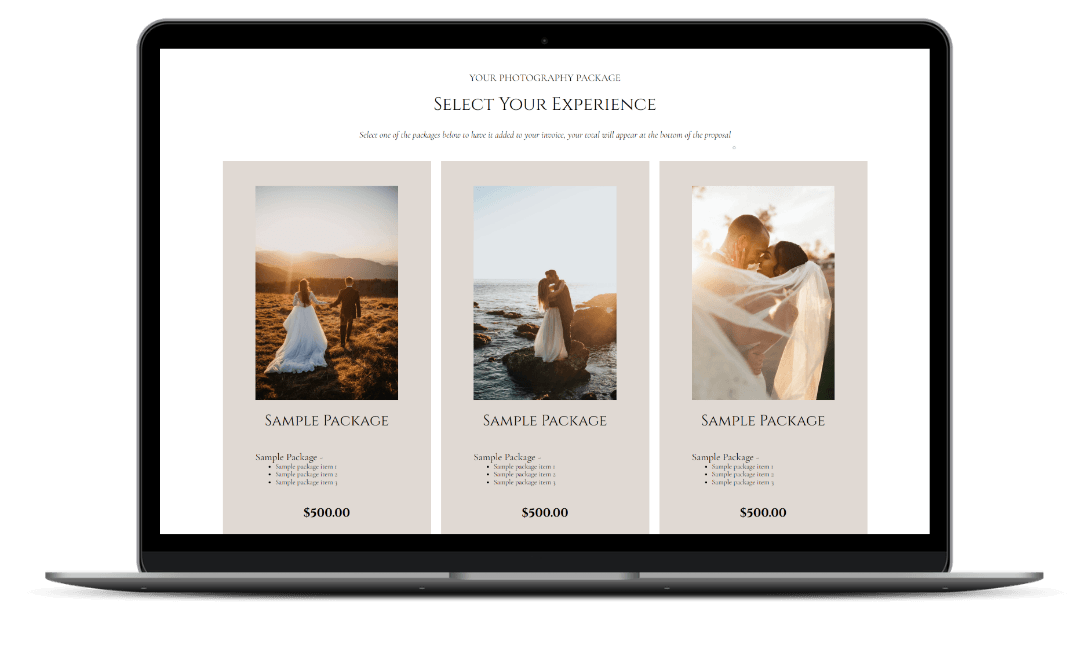
Dubsado proposal for clients to select their photography package
How to Set This Up in Dubsado:
Build a proposal form and add your packages, images, and testimonials
Toggle on contract and invoice in the form settings to create a 3-in-1 proposal
Create separate proposals for different services so each one is tailored to that client type
Add the proposal to a booking workflow with automated follow-up reminders if it is not completed within a few days
3. Digital Contracts
Chasing down a signed contract is one of the most common time drains for photographers. Dubsado solves this by sending clients a link where they can review and sign electronically. Once signed, the contract is automatically stored in their project so everything stays in one place.
You can use smart fields to automatically pull in client details like name, session date, package, and location so you are not manually editing every contract before sending it. One contract template can cover multiple package types when set up correctly, which means less duplication on the backend.
When you connect the contract to your proposal, clients sign it as part of the same flow right after selecting their package. No separate email, no extra step.
How to Set This Up in Dubsado:
Create a contract template and add smart fields to auto-populate client and project details
Connect the contract to your proposal in the form settings so clients sign immediately after booking
4. Automated Payment Reminders
Chasing payments is one of the most awkward parts of running a photography business. Dubsado handles this for you through automated payment reminders that go out before each installment is due, so clients are notified without you having to follow up personally.
You can also enable autopay so clients who prefer it can have payments processed automatically on the due date. Payment plans can be tied to milestones like contract signing, session date, or a fixed calendar date, so the timing always makes sense for your business model.
How to Set This Up in Dubsado:
Set up payment plans tied to relevant milestones for your session types
Enable automated payment reminders in your payment plan settings
Turn on autopay as an option for clients who prefer automatic billing
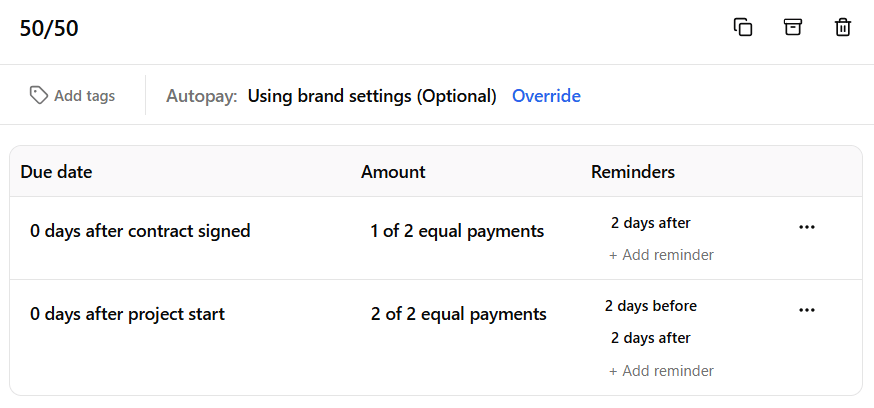
Setting up a payment plan in Dubsado
5. Separate Workflows For Each Service
If you offer more than one type of photography, each service likely has a different process. A wedding client needs months of communication, multiple questionnaires, and a detailed timeline. A portrait client needs a session prep guide and a gallery delivery. A newborn client needs flexible scheduling and specific prep instructions.
Dubsado lets you build a separate workflow for each service so every client automatically moves through the right process for what they booked. Nothing gets missed, and no one receives emails that are not relevant to them.
Kiella had 19 workflows built across her different service types. Each one is fully automated and tailored to that specific client journey.
How to Set This Up in Dubsado:
Map out the full client process for each service type before building
Create a separate workflow for each service with its own emails, reminders, and forms
Use hold actions to pause the workflow at key points until the client completes a required step like signing the contract or paying the invoice
Test each workflow thoroughly before going live
6. Client Portal
Once a client books, they need somewhere to find everything related to their project without having to dig through their inbox for old emails. Dubsado's client portal gives each client a private hub where they can access their contract, invoice, questionnaires, and any files you have shared with them.
You can brand the portal with your logo, colors, and a custom banner so it feels like a seamless extension of your business. Clients can also update their own contact details from inside the portal, which saves you from having to manually update their information when something changes.
How to Set This Up in Dubsado:
Go to Settings and customize your portal with your logo, brand colors, and a desktop and mobile banner
Activate the portal for each new client through their project, or automate it through a workflow
Share the portal login link in your welcome email or embed it directly on your website so clients can always find it
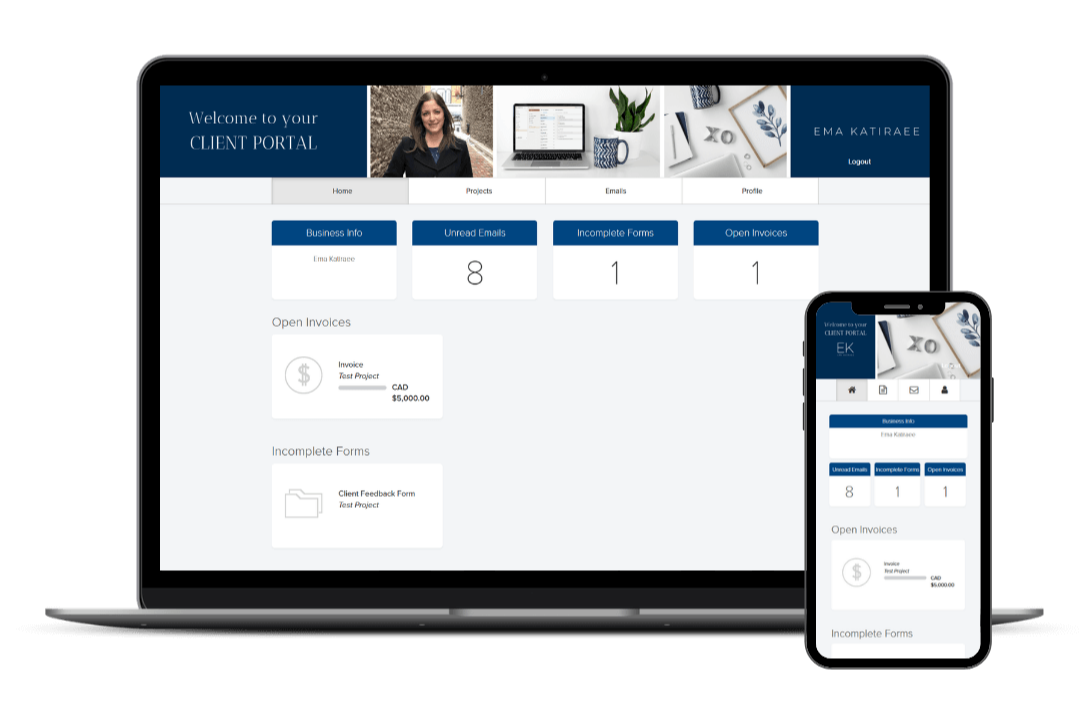
The Dubsado client portal as seen by your clients on desktop and mobile
7. Calendar Sync and Scheduling
Double bookings are a real risk for photographers managing multiple session types across different calendars. Dubsado's scheduler syncs with your external calendar so your availability always reflects what is actually on your schedule, not just what is booked inside Dubsado.
Clients can book directly into your calendar without the back and forth, and automated confirmation and reminder emails go out without you doing anything. For photographers who offer multiple session types, you can create separate schedulers for each one with their own availability windows.
How to Set This Up in Dubsado:
Connect your external calendar in Settings so Dubsado accounts for all your existing commitments
Create a scheduler for each session type and set your available time slots
Add automated confirmation and reminder emails to each scheduler
Drop the scheduler link into your inquiry workflow or embed it on your website
Scheduling can be a logistical challenge for photographers, but Dubsado simplifies this aspect of your business as well.
8. Gallery Delivery and Post-Session Follow Up
Most photographers put a lot of thought into the booking experience. The offboarding, what happens after you deliver the gallery, often gets less attention. But it is one of the highest-leverage parts of your client process.
With Dubsado's custom mapped fields, you can store your gallery link inside the client's project and use it in automated emails so the delivery goes out exactly when it should, with the right link, without you manually sending anything. A follow-up requesting a review can go out a few days later automatically.
For a full breakdown of what to include, read Dubsado Post-Session Workflow Guide for Photographers.
Kiella also used this part of her setup to streamline her album sales process. Clients can now order wedding albums effortlessly after their wedding day, which increased her revenue without adding any extra work on her end.
How to Set This Up in Dubsado:
Use a custom mapped field to store the gallery link inside each client's project
Add the smart field for that mapped field to your gallery delivery email so it pulls in the correct link automatically
Build a post-session workflow that sends the delivery email and a review request on schedule relative to the session date
Create a feedback form to make it easy for clients to leave a testimonial
Real Results: Photographers Who Use Dubsado
Kiella, Wedding and Boudoir Photographer
Kiella had some workflows and emails in place but knew there had to be a better way. She was manually handling too many steps in her client process. After her Dubsado setup, she no longer has to manage every inquiry, booking, and client touchpoint manually, and now runs a fully automated client journey where the system handles the repetitive tasks so she can focus on her work. Read the full case study here.
What This Looks Like When You're Ready to Build
Getting Dubsado set up properly takes time and strategy. Before building anything in the platform, you need to map out your full client process and get clear on what steps you want to take every client through. From there, you build the templates that deliver each step, your forms, proposals, contracts, canned emails, and schedulers, and connect everything through workflows.
A setup works best when your process is relatively stable. If your packages or session types are still changing frequently, it makes sense to wait before you build out your system and get more clarity on your offers first.
When your systems are set up correctly, a client fills out your inquiry form and it handles what comes next.
You can build this yourself if you have the time and patience to learn the platform. Most people who DIY their Dubsado setup spend 20+ hours just on the build, and can end up with gaps that keep their process more manual than they expected. If you'd rather have it done properly from the start, that's where a specialist comes in.
For a full breakdown of what a done-for-you setup involves, check out What Does a Dubsado Specialist Do?
Frequently Asked Questions
Is Dubsado good for photographers? Yes. Running a photography business involves a lot of admin work: dealing with inquiry responses, booking session, session prep, payment reminders, gallery delivery, and more. Dubsado automates all of it so you can focus on your clients and your creative work instead of your inbox. It's also highly customizable, so you can build it around your specific session types and packages rather than working around a rigid template.
What parts of my photography business can I automate in Dubsado? Most of the repetitive touchpoints: inquiry responses, booking follow-ups, welcome emails, session prep questionnaires, payment reminders, gallery delivery, and review requests. The parts that require your judgment, like reviewing a lead or customizing a proposal, stay with you.
How much does Dubsado cost? Dubsado offers a 21-day free trial. Paid plans are billed monthly or annually. For current pricing, check Dubsado's pricing page directly. If you sign up using my affiliate code EMAKATIRAEE, you'll receive 30% off your first month or year.
Can Dubsado deliver photo galleries? Not directly. Dubsado is a CRM, not a gallery platform. You'll need a separate tool like Pixieset or Pic-Time to host your images. However, Dubsado can send the gallery link to your client automatically through a workflow, so the delivery still happens without you manually sending it. Read How to Send Photo Galleries to Clients with Dubsado for a full walkthrough.
Does Dubsado work for all types of photographers? Yes. Whether you shoot weddings, portraits, branding, family, or commercial work, Dubsado can be built around your specific session types. You can have separate workflows for each type of session so every client moves through the right process automatically.
Do I need a specialist to set up Dubsado or can I do it myself? You can DIY it, but it takes significantly more time than most people expect. Most people spend 20+ hours on a full build and often end up with gaps that keep their process more manual than they wanted. A specialist builds it properly from the start, saving you loads of time. Whether it makes sense to hire someone depends on where you are in your business. Is It Worth Hiring a Dubsado Specialist? gives you an honest answer.
Is Dubsado better than HoneyBook for photographers? Both platforms work well for photographers. Dubsado offers more customization and has advanced automation, which makes it a good fit for photographers with multiple session types or a more complex client process. HoneyBook has a more user friendly interface and is generally considered easier to learn. The right choice depends on your specific needs. For a full side-by-side breakdown, see my Dubsado vs HoneyBook comparison.
Do I need to be tech-savvy to use Dubsado? You don’t need to be a tech expert, but you do need to be comfortable enough with the platform to use it day to day. Most photographers find that once everything is built and they have been walked through it, it’s straightforward to manage.
Can Dubsado replace other tools I am already using? Often yes. Dubsado can replace your scheduler, contract tool, invoicing platform, and form builder. Most photographers end up using it instead of three to five separate tools.
How long does it take to set up Dubsado for a photography business? A basic setup with one workflow and a few templates can take a focused weekend. A full setup with multiple service types, custom workflows, and branded forms typically takes two to four weeks to do properly on your own, or a few days if you work with a specialist.
What would your client experience look like if it actually ran itself?
Take the free quiz to find out what your setup is missing and where to start.
Ready to Get Dubsado Working for Your Photography Business?
As a Certified Dubsado Specialist, I build done-for-you Dubsado setups for photographers, so you get a system built around your actual process and services, not a cookie-cutter template.
Book a free Discovery Call to find out if a Dubsado setup is the right next step for your photography business.
Get 30% off your first month or year of Dubsado with code EMAKATIRAEE