Updated October 2026. By Ema Katiraee, Systems Specialist
Disclaimer: This post contains affiliate links. If you sign up using my link, I may earn a commission at no extra cost to you.
If you're looking into HoneyBook and trying to figure out which plan makes sense before you commit, you're in the right place. If you're wondering how much HoneyBook costs per month, there are three paid plans - Starter at $29/month, Essentials at $49/month, and Premium at $109/month (all billed annually) - and the differences between them matter more than the price gap suggests.
This post breaks down what's included in each plan, who each one is actually for, and how to get the best price so there are no surprises.
And before we get into it: HoneyBook offers a 30-day free trial, and there are a few ways to save when you sign up (more on that below).
Does HoneyBook Have a Free Trial?
Yes. HoneyBook gives you 30 days to try the platform before you pay anything. No credit card required to start.
I'd encourage you to actually use the trial rather than just sign up and forget about it. Send yourself a proposal, run through a scheduling session, test out what the client portal looks like on the receiving end. You'll get a much better sense of whether HoneyBook fits your workflow when you've actually moved through it.
Once the trial ends, you'll need to choose a paid plan to keep going.
HoneyBook Pricing at a Glance
These are HoneyBook's standard prices. HoneyBook often runs limited-time deals, so check their site for any current offer. HoneyBook also charges a processing fee on each client payment, separate from your plan. I cover the rates in What Is HoneyBook?
Starter Plan: $29/month (billed annually) or $36/month (billed monthly)
Essentials: $49/month (billed annually) or $59/month (billed monthly)
Premium: $109/month (billed annually) or $129/month (billed monthly)
All plans start with a free trial, and you can change or cancel at any time.
Comparing this to Dubsado? Here's the complete Dubsado vs HoneyBook guide.
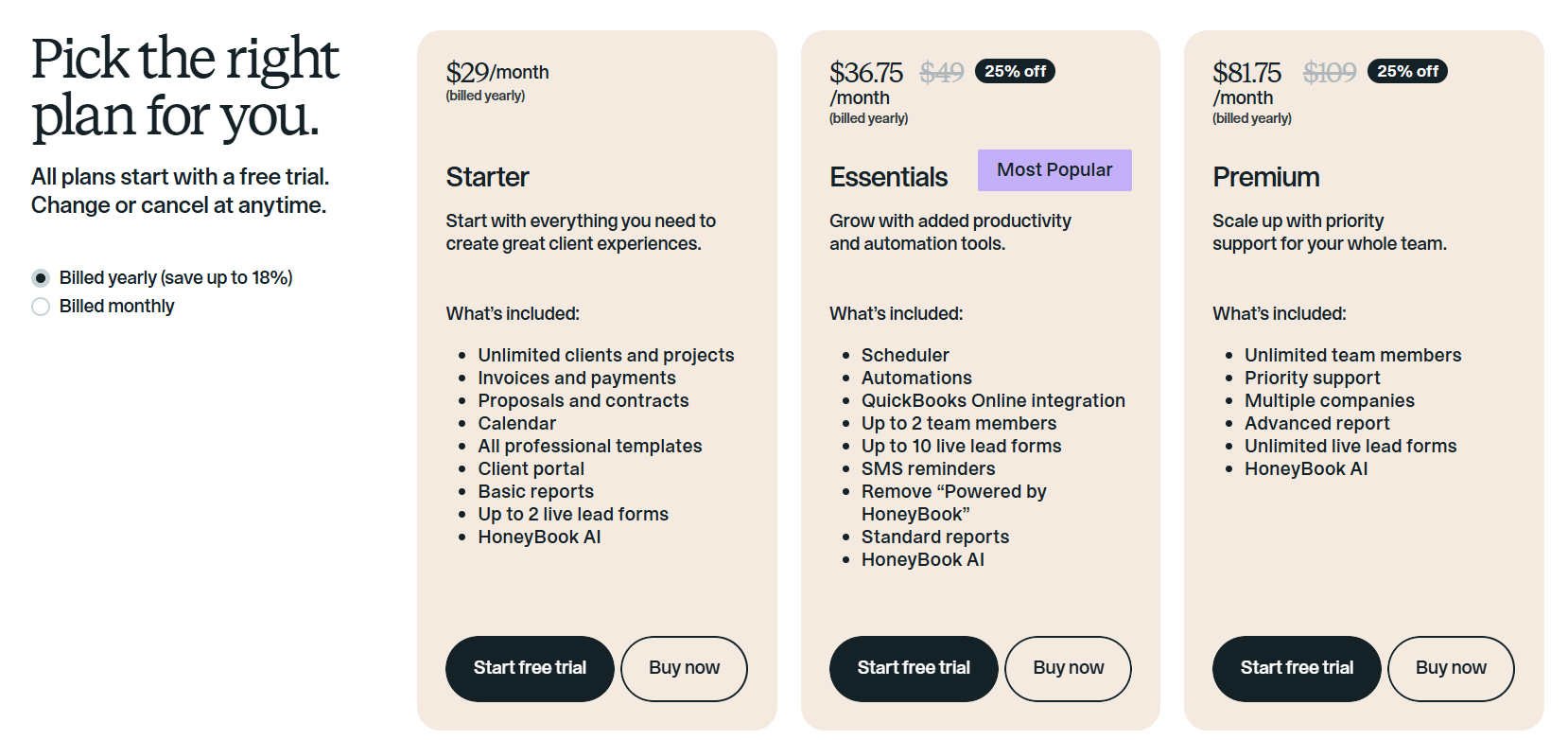
HoneyBook pricing for Starter, Essentials, and Premium plans
How to Get a Discount on HoneyBook
The simplest way to save: use my referral link to get 30% off your first year.
Beyond that, HoneyBook has deals every so often. New subscribers on Essentials or Premium can get 15% off monthly plans, or 25% off if you commit to an annual plan. These deals usually appear at checkout without the need for a code.
Annual billing on its own saves you roughly 18% compared to paying month-to-month, even without a code. Combined with a referral link, it's the lowest cost way to get started.
The Starter Plan
$29/month (billed annually) or $36/month
The Starter plan covers the basics: proposals, contracts, invoices, payments, a client portal, and calendar sync. If you're just getting started and need a more organized way to book clients and collect payments, this gets you there.
What’s included:
Unlimited clients and projects
Invoices and payments
Proposals and contracts
Calendar sync
All professional templates
Client portal
Basic reports
1 live lead form
1 scheduler session type
Email reminders for meetings and payments
Email and calendar integrations
Pic-Time integration
HoneyBook AI
What's not included in Starter:
The main limitations to know about: no automations, no SMS reminders, no custom fonts, and the "Powered by HoneyBook" label stays on your emails, forms, and client portal. You also only get one lead form and one scheduler session type, and you can't connect third-party tools like Zapier, QuickBooks, Zoom, Canva, Flodesk, Calendly, or Prismm. There's also no expense tracking or automated tax categorization.
So if you're planning to automate any part of your client process, or you run your business across multiple tools that need to sync, you'll need to step up to Essentials.
The Essentials Plan
$49/month (billed annually) or $59/month
The Essentials plan is where HoneyBook starts to feel like a real system rather than just a document-sending tool. Everything from Starter is included, plus automations, unlimited scheduling, full branding control, SMS reminders, and the integrations that let HoneyBook connect with the rest of your tech stack.
What's added in Essentials:
Automations
Unlimited scheduler session types
Task assignment
SMS reminders (for meetings and payments)
Up to 10 live lead forms
QuickBooks Online integration
Zapier integration (and all other third-party integrations: Zoom, Canva, Flodesk, Calendly, Prismm)
Expense tracking and automated tax categorization
Custom fonts
Remove "Powered by HoneyBook" from emails, forms, and portal
Standard reports
Up to 2 team members
This is the plan most service providers will land on. The automations alone make a noticeable difference once you're not manually sending every follow-up and onboarding email. And if you care about your client-facing materials looking polished and on-brand, being able to remove the HoneyBook label and add custom fonts matters.
The Premium Plan
$109/month (billed annually) or $129/month
The Premium plan is built for businesses with teams or multiple brands. Everything from Essentials is included, plus unlimited team members, priority support, an onboarding specialist during your first 90 days, and the ability to manage more than one company or brand under a single account.
What's added in Premium:
Unlimited team members (Essentials caps at 2)
Unlimited live lead forms (Essentials caps at 10)
Multiple companies or brands under one account
Advanced reports
Priority support
Access to an onboarding specialist in your first 90 days
If you're a solo operator or small team that doesn't need multiple brands, this plan is likely more than you need. The jump from $49 to $109/month is significant, and most of what makes HoneyBook useful day-to-day is already in Essentials.
That said, if you do run more than one business through HoneyBook, Premium is the only plan that supports it.
Starter vs Essentials vs Premium: Which One Is Right for You?
Go with Starter if:
You're brand new to client management tools and want to start simple
You only need contracts, invoices, and basic document-sending right now
You don't need automation and are okay with manually moving leads through your process
You're testing HoneyBook before committing to a higher plan
Go with Essentials if:
You want to automate as much of your client process as you can
You need scheduling (more than one session type)
You use or plan to use tools like QuickBooks, Zapier, Zoom, or Flodesk
You want your client-facing materials fully on-brand without HoneyBook's label
You're a solo owner or small team (up to 2 people)
Go with Premium if:
You have a team of more than 2 people
You run more than one business or brand
You want priority support and hands-on onboarding help
You can start on a lower plan and upgrade later, so it's not a permanent decision. That said, if you already know you want automations and integrations, just start on Essentials.
FAQs
How much does HoneyBook cost per month? Plans start at $29/month billed annually, or $36/month billed monthly. Essentials is $49/month (annual) or $59/month (monthly). Premium is $109/month (annual) or $129/month (monthly).
Is there a free version of HoneyBook? There's no permanent free plan, but the 30-day free trial gives you full access to try the platform with no credit card required.
Can I upgrade or downgrade my plan later? Yes, you can change your plan at any time from your account settings.
Does HoneyBook charge per client or project? No. All plans include unlimited clients and projects. You're paying for the plan tier, not for how many people you work with.
How do I get a discount on HoneyBook? Use my referral link to get 30% off your first year. HoneyBook also occasionally runs promotions for new subscribers at checkout.
What's the difference between HoneyBook Starter and Essentials? The biggest differences are automations, integrations, and branding. Starter has no automations, so everything gets sent manually. It's also limited to one lead form, one scheduler session type, and only connects with email, calendar, and Pic-Time. Essentials adds automations, all third-party integrations (Zapier, QuickBooks, Zoom, Canva, Flodesk, Calendly), custom fonts, and removes the "Powered by HoneyBook" label. For most service providers, Essentials is the plan that makes the tool worth it.
What's the difference between Essentials and Premium? The main differences are team size (2 members vs. unlimited), number of live lead forms (10 vs. unlimited), multiple company/brand support (Premium only), and access to priority support and an onboarding specialist (Premium only).
Ready to Get Your HoneyBook Set Up?
If you've decided HoneyBook is the right tool and you'd rather hand the setup off to someone who does this every day, that's exactly what I offer.
I work with photographers, wedding planners, and other service providers to build out a fully custom HoneyBook setup - lead forms, automations, proposals, the whole thing - so your client experience is clean and consistent from the first inquiry.
The first step is a free discovery call. We'll talk through your current process, what's missing, and whether working together makes sense.